Stop choosing between the power of an assistant that acts on its own, the comfort of a real workspace and control over your digital life.
Personal AI assistants take several approaches. Agents such as OpenClaw and Hermes Agent are powerful at running commands and automating tasks. Their chats, consoles and shared profiles offer plenty of freedom, with technical setup to take in hand.
Consumer assistants such as Meta Muse offer a smooth, accessible experience. You can follow their actions and take over, while your data stays on the publisher’s servers and the publisher manages the hosting.
60+
functional building blocks
LIA brings these two worlds together and creates her own category: a personal, family and sovereign AI platform from end to end, installed on the server of your choice.
A complete environment of 60+ building blocks under the free AGPL license, combining an AI that can act for you, everyday tools that use no AI at all when you work them yourself, and professional-grade safeguards.
Beyond agents: a personal, family and sovereign AI platform
The power of an assistant that acts on its own and the comfort of a real workspace, plus control over your data and a place for the whole family.
The power of an AI agent, without the compromises
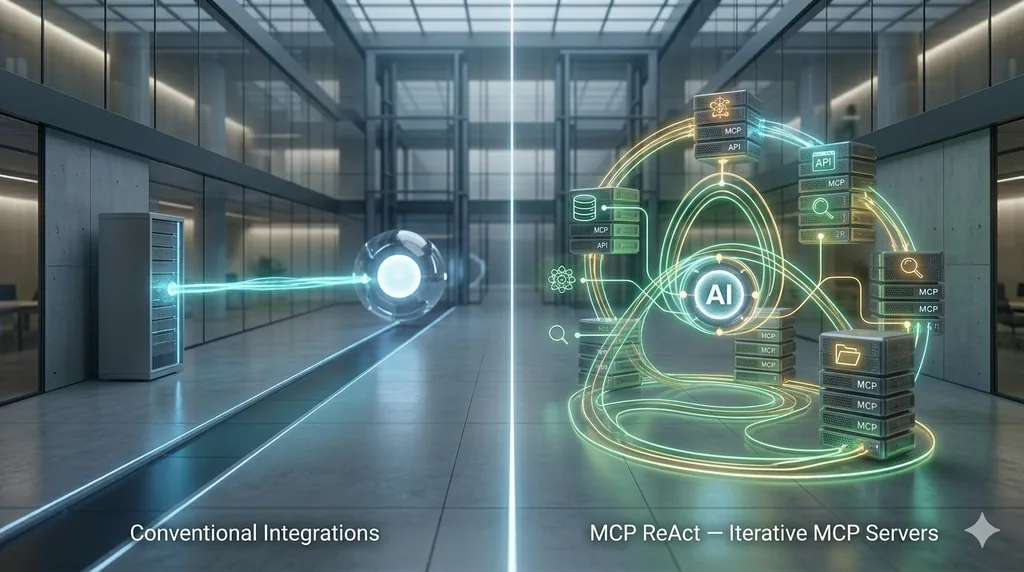
LIA works in two ways: following a checked plan step by step (Pipeline mode), or searching by herself, attempt after attempt, when the request is open-ended (ReAct mode). Like OpenClaw and Hermes, she can also take real action: drive a web browser, run exact calculations in an isolated space, plug into third-party tools (MCP servers and their apps) and learn new know-how through skills and plugins, including the ones she writes for you and you install in one click.
The “Manual + AI” hybrid: AI only when you call on it
Why pay an AI and wait for its answer to archive an email or move a meeting? LIA gathers your everyday tools in one interface: Gmail, Outlook, iCloud, calendars, tasks, contacts, Google Drive, OneDrive and even your Philips Hue lights. When you do it yourself, your actions go straight to your providers: no AI involved, no cost, no answer to wait for. And one click on a yellow star brings LIA in.
A platform for the whole family, with a face and a 3D world
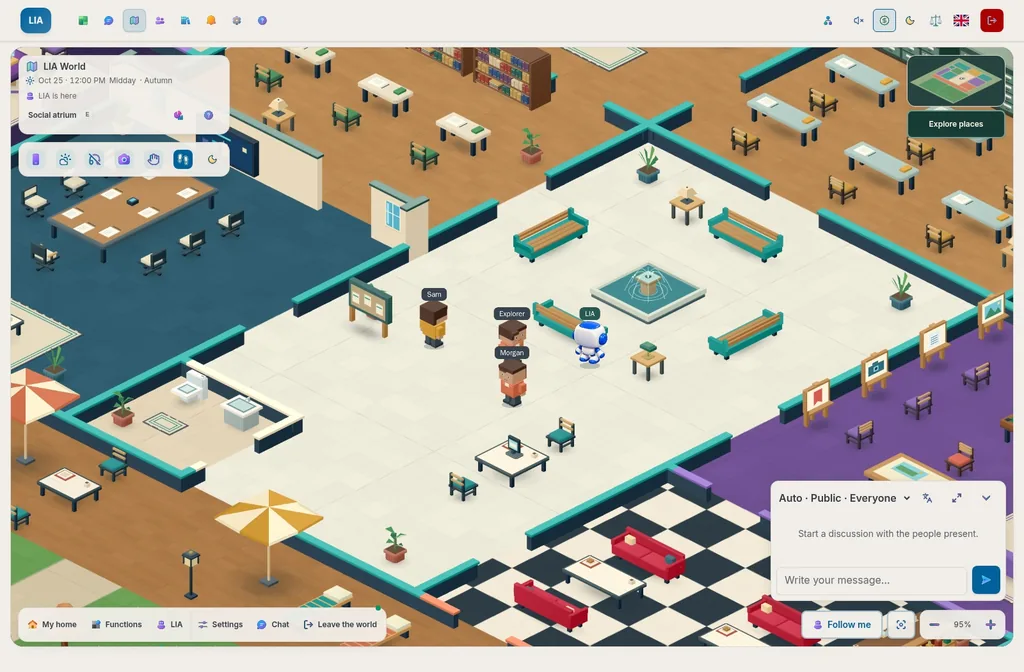
An assistant shouldn’t be a lonely program on a developer’s computer. LIA welcomes your family and close ones on the same server: everyone gets their own account, data and spending limits, with sharing you choose and connections between your accounts. She comes alive with animated avatars and a 3D world you explore together.
Beyond text: live voice, phone and media
LIA talks with you live, in a real spoken conversation where you can cut in at any time (two real-time modes: Live and Live direct). She can call you, or call someone for you once you approve, keep an archive of your text messages, host a personal radio made for you and create images.
Governance, GDPR and professional-grade monitoring
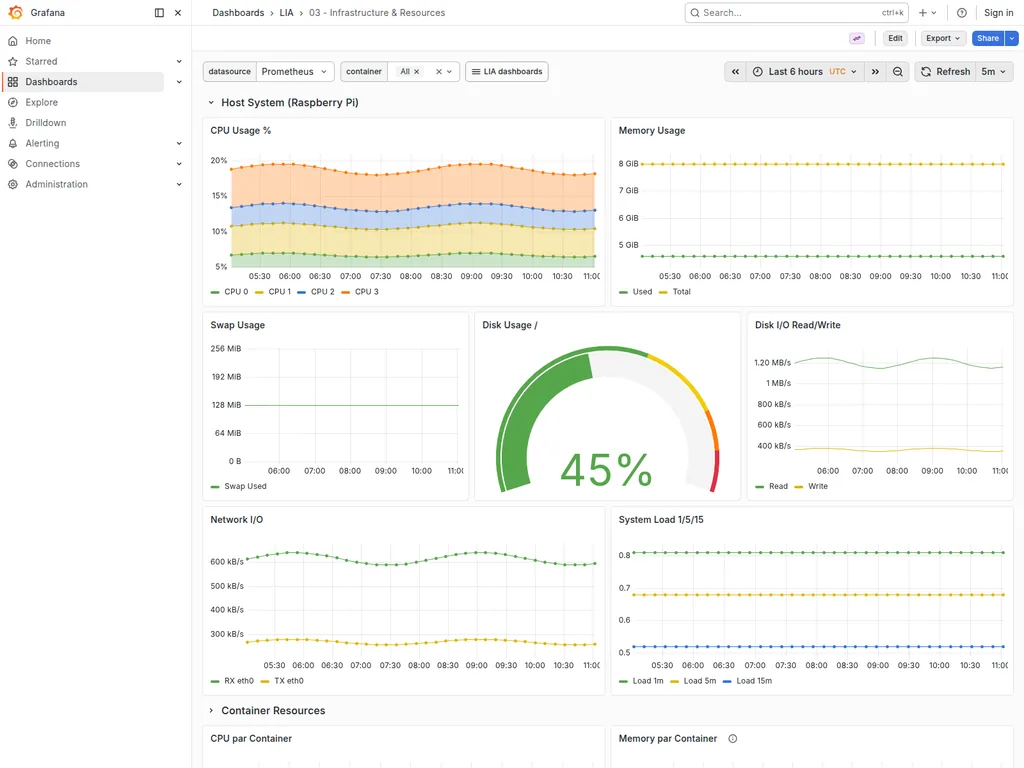
Self-hostable with Docker and free under the AGPL license, LIA ships what experimental open source projects often lack: management of several accounts, spending caps per person, the cost of every exchange shown to the cent, your approval before sensitive actions, the GDPR tools (full export of your data, right to be forgotten) and Grafana dashboards to follow activity in real time.
Head to head: why choose LIA?
Six criteria, three duels: pick who LIA takes on.
LIA versus
LIA
The sovereign butler
“Does the dirty work, keeps your data at home and won’t empty your wallet.”
Frugal: AI costs nothing when you do it yourself
VS
OpenClaw
The caffeinated hacker
“Lives in your terminal, speaks fluent Bash, never sleeps.”
Appetite: AI gets to work when you give it a task
CriterionLIAOpenClaw
Acting on its own
LIA
Yes
Two ways of working, real tools
As muscular as a developer’s agent, yet kept in check when it matters.
A checked plan step by step, or a search of her own
A driven browser and exact calculations in an isolated space
Third-party tools (MCP), skills and plugins, including the ones she writes
OpenClaw
Yes
Runs commands on your machine
Powerful, but watch out for over-enthusiastic commands.
System commands and a driven browser
Scheduled tasks, skills and plugins
Everyday use, and what it costs
LIA
Yes
Your tools by hand, LIA as backup
You don’t pay an AI to archive three emails.
Mail, calendar, tasks, files and Hue lights, with no AI
Your actions go straight to your providers
A yellow star to ask LIA for help
OpenClaw
Partly
Chat and a web console
Chatting with a bot just to move a meeting gets old fast.
WhatsApp, Telegram, Discord or its web console
AI carries out the tasks you request in chat
Family, close ones and 3D
LIA
Yes
The whole household on one server
The assistant where the whole household belongs.
One account per person, activated by the administrator
Sharing and connections between accounts
Animated avatars and a shared 3D world
OpenClaw
Partly
Several people, set up by hand
Flat-sharing, yes. The lease, you write it yourself.
Individual sign-in, profiles and roles
Shared trust between participants, no 3D world
Voice, phone and media
LIA
Yes
She talks to you live and makes your calls
She talks with you, makes your calls and hosts your radio.
Two real-time voice modes
Calls once you approve, an archive of your texts
Personal radio, images and meeting summaries
OpenClaw
Yes
Live voice, phone as an option
It picks up the phone too… once the plugin is installed.
Continuous voice conversation in its apps
Calls through a plugin, generated images and music
Memory and control
LIA
Yes
A memory you can see and correct
Nothing important leaves without your green light. And you see everything.
Memories you can browse and edit
Follow-up of your close ones and pending promises
Your approval before what matters, export and erasure
OpenClaw
Partly
File-based memory, guardrails to set
Great freedom, great responsibility.
Memories written in readable text files
Command approvals depending on the mode you pick
Administration and costs
LIA
Yes
Everything is set and measured
An IT manager’s dream: everything is measured.
Accounts and spending caps per person
The cost of every exchange shown to the cent
Self-diagnosis and Grafana dashboards included
OpenClaw
Partly
A web console, measurements to wire up
Everything is measurable… if you build the dashboard.
Estimated cost of every answer
Exportable metrics, Grafana to install yourself
Sources
What this table says about other assistants comes from their official documentation and announcements, read on November 16, 2026.
Explore real workflows, settings and LIA World. Open a screenshot full screen to read the details.
01 / 41
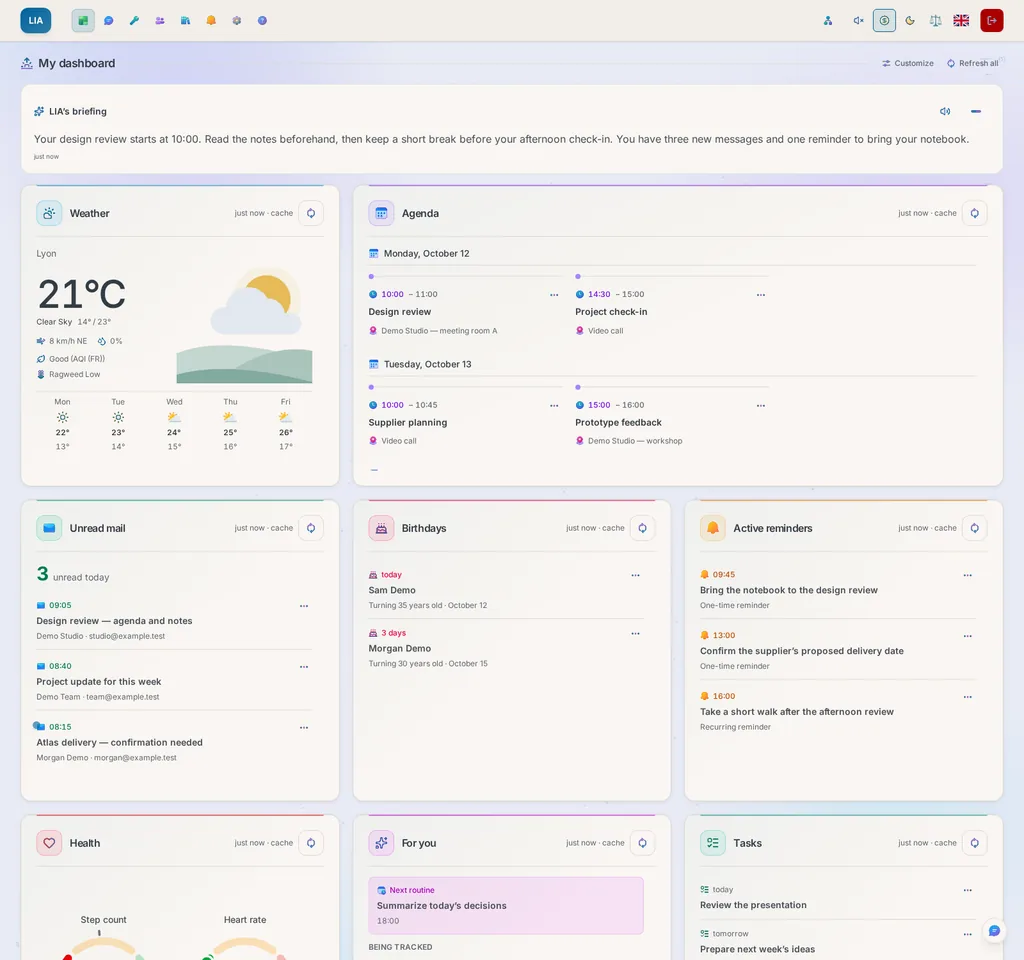
Your personal hub: daily summary, calendar, emails, tasks and reminders in one place.
01 / 15
Slide 1 of 15
Captures from the actual application and Grafana, with fictional demonstration data. They illustrate the interface, not measured performance.
One day, many ways to help
Pick up the thread. Prepare what comes next.
Finding the right file, keeping a commitment, preparing your next conversation with someone: LIA works with what you have chosen to open up to her.
An assistant that gets to know you
Her memory, the Relations page and your knowledge spaces let her pick up the thread without you having to tell the whole story again.
Proposals you can inspect
You review her sources and drafts, and you approve anything sensitive. The registers keep a record of what she read, what she tried and what came of it.
An app you can make your own
Designed in France and open source under the AGPL license. Use an existing instance from your browser, or install your own with Docker. Hosting and external services may cost money.
What you share today can help tomorrow.
LIA can use your preferences, your exchanges and your commitments for your next request, within the limits of the enabled features and the sources you have authorized.
Your reference points
Your preferences, memories, rules and knowledge, which you can view and correct.
Your relationships
Each person, with your exchanges and open commitments, to prepare your next contact.
Your next steps
Your appointments, projects and follow-ups, drawn from the sources you allow.
Your choices
Your answer style, your interests, your sources and the times when LIA may reach out to you.
For example, before you meet Claire again…
The Relations page finds your last exchange with Claire and the commitment still open. In the conversation, LIA helps you prepare the meeting from the sources she can access, and gets to the point because you prefer concise answers.
When you ask
A summary based on your file and on what LIA found.
When LIA suggests
A useful signal, drawn from your sources, in the time windows you have allowed.
When you delegate
An action prepared for you, which you review and approve when it needs your consent.
You can view and correct her memory, limit her sources or switch off her initiatives. Keep a critical eye, too: her conclusions still need checking.
TOOLS
CHAPTER 01
Do it yourself, or ask.
Your mail, calendars, tasks, contacts, files and lights each have their screen. You work by hand, with no AI, and hand over to LIA when that is simpler.
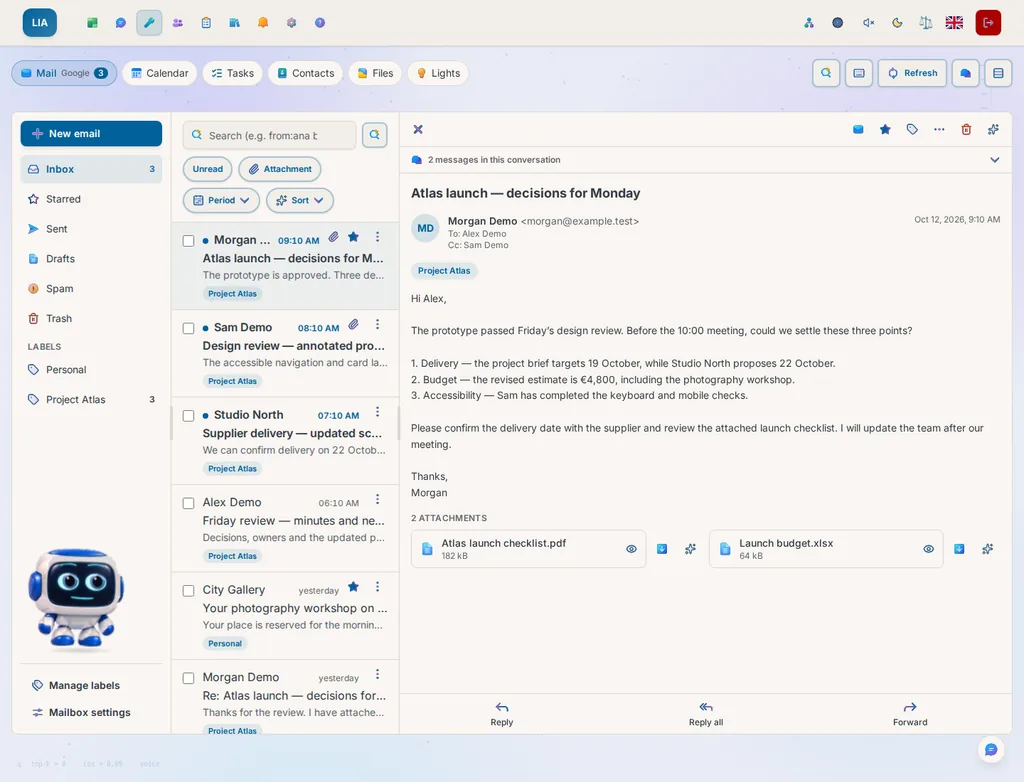
Your tools: the mail, its folders and an open message, without going through the chat.
Six tools, one way of working.Gmail, Outlook or iCloud, Google Drive or OneDrive, Philips Hue: each tool acts on the account you connected, on the same screens from one provider to the next.
By hand, no AI comes into it.Your gestures go straight to your provider, with no token to pay. Nothing is added to LIA’s registers, her memory or your journal.
And LIA takes over when you want.Yellow stars ask LIA to sum up, write, translate or fill a form: a proposal to read, the cost shown, nothing written at your provider. “Ask LIA” opens the chat on it, and nearly all of it can be asked in conversation, with a card to confirm as soon as it reaches someone else.
What makes this possible
Each tool talks directly to the service you connected, through an interface that does not depend on the provider: what a service cannot do is not offered, and what failed is said. Nearly all you do here, the assistant can do too. Deleting for good stays yours.
Explore the engineering : One screen per tool, shared by Google, Microsoft and Apple · Gmail, Outlook, iCloud · Google Tasks, Microsoft To Do · Google Drive, OneDrive · Philips Hue · search across every tool (Ctrl+K) · PDF and Word read in the page · by hand, no model call · yellow stars: one click, one proposal.
Explore the capabilities
Choose a topic to see what it brings you.
Example request
I sort a mail and answer an invitation, without going through the chat.
What you can get
The gesture goes straight to your provider, with no AI call, and nothing enters LIA’s registers.
Possibilities you can combine
Tools: your services, by your own hand
Open Tools when you would rather do it yourself. Your mail sorts on Gmail, Outlook and iCloud, with a moment to take a message back. Your calendars answer invitations and repeat events on the three providers, your tasks gather under Today, Overdue and Coming up, your contacts keep their photo, groups and vCard. Your files live on Google Drive or OneDrive, and a PDF, a Word file or a spreadsheet reads in the page. Ctrl+K searches them all and says what it could not reach. By hand no AI is called, and what you do stays yours, out of LIA’s registers. Yellow stars ask LIA to sum up, write, translate or fill a form: one click, a proposal to read, the cost shown. Nearly all of it can be asked in conversation too, with a card as soon as it reaches someone else.
Example request
I select a sentence of a message and choose Task.
What you can get
The task form opens with the sentence’s words and its date; nothing is saved until I click.
Possibilities you can combine
Text menus, everywhere
Select words anywhere in LIA, the chat included, and a small menu offers to read them aloud, explain, summarize, simplify, translate or search the web, naming the service it asked and its sources. A task, an event, a reminder, a ticket or a memory opens the form you already know, filled in, and nothing is saved until you click. While you write, a selection is corrected, formatted, shortened, made more formal or warmer, and the browser’s undo still works. Passwords and security codes are left out, and every answer shows its cost.
Example request
I sort ten mails at once and answer Camille’s.
What you can get
Each gesture goes to your provider and can be undone for a moment, with no AI call.
Possibilities you can combine
Mail: sort, write, take back
Sort your mail on Gmail, Outlook or iCloud: archive, move, star, report spam, and undo with one click what you just sorted. A message shows in its original layout, in an isolated frame where remote images wait for your say. Write with formatting and a signature, attach a file from your device or your drive, and take a message back for a few seconds after you send it. A reply or a forward can be kept as a draft in its conversation, each message says whether you already answered it, and yellow stars sum up, translate or propose a reply written the way you write, at your click.
Example request
I move Thursday’s meeting to 3 pm and answer Friday’s invitation.
What you can get
The event changes slot, the organiser gets your answer, and an event with guests waits for you to save.
The essentials at a glance
Calendar: see, answer, move
Agenda, day, week or month, with your dated tasks on their day. A click on a slot starts an event, which can repeat, carry a reminder, or a video call where your provider offers one. Answer an invitation and the organiser is told. On a computer, drag an event to another time: if it has guests, nothing leaves until you save. Describe an event in a sentence and LIA fills the form; on a meeting, find its minutes or start its recording.
Example request
I look at what is overdue and push two tasks to tomorrow.
What you can get
The Overdue view gathers all your lists, and each new date goes to your provider.
Work followed through to its result
Tasks: your lists and your due dates
All tasks opens every open task of every list, each naming its list, beside Today, Overdue and Coming up, on Google Tasks or Microsoft To Do. Tick, edit, set a due date in one gesture, move a task to another list and act on several at once. Subtasks with Google; steps, importance and reminders with Microsoft: each task keeps what its service keeps, and a dated task also shows in your calendar. A sentence becomes a task to check and, with Microsoft To Do, LIA breaks it into steps.
Example request
I open Ana’s card before calling her.
What you can get
Her numbers, her latest mail and your meetings are on the same card.
Your context stays within reach
Contacts: the card and your latest exchanges
Search, filter by group and edit a card on Google, Outlook or iCloud: photo, addresses, numbers, groups, vCard to import or export. The card shows your latest exchanges, mail received and sent, meetings organised by either of you, and each line opens in its tool. With Google, a contact met by mail joins your own in one click. LIA writes a new card from a sentence or a business card, completes one from their messages, each value with the message that says it, and phones one of their numbers once you agree; the calls she placed and the texts they sent join your latest exchanges.
Example request
I read the minutes as a PDF and file them in the project’s folder.
What you can get
The document shows in the page, and the move goes to your drive.
A document to read, use and share
Files: your drive, read in the page
Browse Google Drive or OneDrive, search the names or the content, create, rename, move, copy, share, send by mail. A PDF, a Word file, a spreadsheet, a Markdown or an image reads in the page, on a computer as on a phone, and a text file can be changed on the spot. An attachment can be kept on your drive, and both services share the same screen. LIA sums up a file or describes an image, and a file can be kept in a knowledge space.
Example request
I switch off the living room and start the Reading scene in the study.
What you can get
The Hue bridge applies the command, and the screen shows the state it reports.
The right atmosphere, on request
Lights: your Hue bridge, room by room
Switch, dim and colour a lamp or a whole room, and start a scene, a zone’s included. A room that is off stands apart from the page, a lamp the bridge cannot reach stands apart, and one button switches everything off, then on again. Only the controls each lamp supports are offered, and the same can be asked of LIA in conversation.
Example request
I look for “Horizon quote” everywhere.
What you can get
Mail, events, contacts and files each answer under their name, and a tool out of reach is named.
Answers connected to your sources
Search: all your tools at once
Ctrl+K or Cmd+K looks for your words in your mail, calendars, contacts and files, from any tool. Each answers under its name, says when it found nothing or when its list is cut, and one that could not answer is named. A result opens in its tool, and your search waits for you to come back. The request goes to your providers when you start it.
1 of 9
ACTS
CHAPTER 02
Before, during and after your conversations.
Prepare the meeting, talk out loud, then find what was decided and what is left to do.
Before: the context and useful questions.LIA gathers the documents, the latest exchanges and the meeting decisions. You walk in knowing what needs clearing up.
During: speak and interrupt naturally.Talk to her in Live with your Gemini, OpenAI or ElevenLabs key. The voices on offer, and what the voice can hand over to LIA, vary by provider.
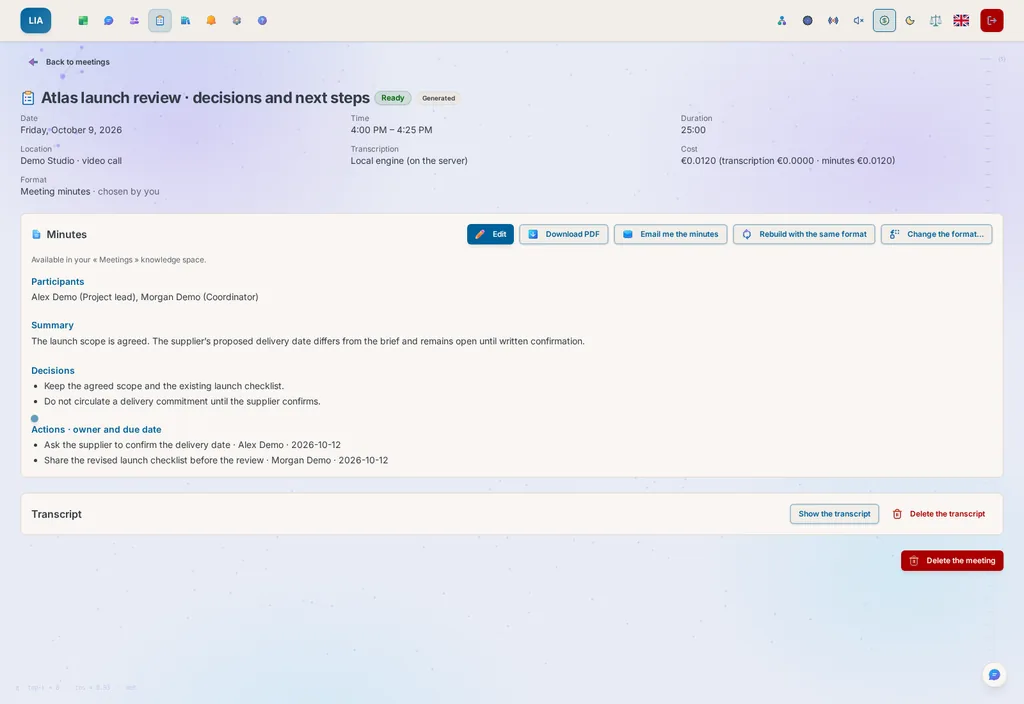
After: minutes to correct and share.Record the meeting, review the decisions and action items, then share the PDF. Once the minutes are indexed, you can find them again in conversation.
What makes this possible
For a precise request, Pipeline mode prepares a plan; to explore, ReAct mode adjusts its searches along the way. Either way, the sources used, the proposals and the confirmations stay attached to the work.
Explore the engineering : 38 agents working in parallel · live voice sessions on your own Gemini, OpenAI or ElevenLabs key · five voice engines, including Fish Audio · phone calls placed by LIA through your ElevenLabs connector · browser control · Philips Hue · images and diagrams on demand.
Explore the capabilities
Choose a topic to see what it brings you.
Example request
Prepare my day from my calendar, my tasks and the relevant emails.
What you can get
The specialists bring together the sources they can access, and independent steps can move forward at the same time.
One request, several coordinated actions
38 specialised agents
Emails, calendar, contacts, files, tasks, weather, web search, places, routes and reminders: LIA can get the specialists a single request needs working together. Independent steps can move ahead in parallel, while those waiting on a result keep their order. You stay in the conversation to prepare your day or pull together the pieces of a project. The available capabilities depend on your access and on the instance, and the time it takes depends on the work, the models and the services used.
Example request
Call this restaurant and ask for a table for two tomorrow at 8 pm.
What you can get
A draft for you to confirm, with who is being called, the number and the purpose; a configured telephony connector is needed.
From a call to a written summary
LIA makes calls for you
With your ElevenLabs telephony connector set up, LIA can reach a contact, ask a question or request a time slot for you. You approve who is called, the number and the purpose before the call, then a summary comes back to the conversation. Her instructions tell her to commit to no unexpected spending and to report the other options back to you. Review the outcome before deciding what comes next. Availability and costs depend on the configured services.
Example request
With my Live key, I talk to LIA and ask her to prepare my day.
What you can get
A conversation where you can talk at the same time as LIA; in delegated mode, your requests go through the chat and its confirmations.
A conversation you can speak
Talk with her live, on your own key
Think out loud with LIA in a real conversation where you can both speak at the same time, using your Gemini Live, OpenAI or ElevenLabs API key. In delegated mode, your requests go through the chat engine, with its context and its confirmations before acting. Direct mode sticks to authorized reads. In both, the voice speaks in the personality you chose. The models, the voices, the way to interrupt and what the voice can hand over to LIA, including in parallel, vary by provider. Availability and costs depend on the configured services.
Example request
I record the team meeting, then review and correct the minutes.
What you can get
Structured minutes, a PDF and a copy sent to yourself; for LIA to find them in conversation, they must have been indexed.
A document to read, use and share
Record a meeting, get the minutes
Record a meeting from the app, choose the minutes format, then review the structured minutes prepared by the configured engines. Correct the decisions and the tasks mentioned, download a PDF to share or receive it by email. LIA is supposed to flag gaps and unattributed remarks: review the minutes anyway. Once the minutes are indexed in your enabled knowledge, LIA can find them in conversation, and you can track down a decision by searching the full document. The processing cost is shown, and availability depends on the instance’s capabilities and services.
Example request
Open this public site and find the product’s specifications.
What you can get
LIA browses the site and you see the screenshots as she goes; signing in and paying stay outside what she does on her own.
A visible journey, step by step
Browser control
For what no API can reach: looking for a product on a shopping site, filling in a form, pulling the data out of a page built in JavaScript. LIA uses the site the way you would, checks the page again after every action, and you follow her browsing live through the screenshots shown in the conversation. On a purchase journey, she stops at the sign-in or payment step and tells you how far she got: she never enters credentials and never confirms a payment. The browser is the system’s own Chromium, updated along with it.
Example request
Turn this summary into a PDF report with a comparison table.
What you can get
A file built in one of the supported formats, ready to review and download from the conversation.
A document to read, use and share
AI document generation
LIA turns the information from your project into a CSV file, an Excel spreadsheet, a Word report, a PowerPoint presentation or a PDF. A model writes the content in your language, then a local engine builds the file, with no external conversion service. A spreadsheet carries formulas that recalculate, totals and native charts; a presentation, key figures and editable charts; a report, a cover page and cited sources. You decide in your settings whether LIA adds illustrations, each counted in your costs. You find the result in the conversation to review, download or share. Depending on the enabled capabilities, generation can follow a search, in the same request.
Example request
Convert 250 dollars to euros and give the date of the rate.
What you can get
The amount is calculated by a tool, with the date of the rate, instead of being estimated by the model.
Numbers you can verify
Computed, not guessed
A percentage, the number of days until a date, 250 dollars in euros, durations to add up: an AI answers these plausibly but wrongly, and without warning you. LIA hands these calculations to a tool (exact decimal arithmetic, dates computed on real instants, European Central Bank rates with their date), in both modes. For everything else, in ReAct mode, she writes a few lines of Python and runs them in a locked sandbox: a throwaway container with no database, which reaches the web only through a single proxy, your keys being swapped in outside it. You get a result you can check.
Example request
Call me on my verified number to prepare my day.
What you can get
LIA calls your own verified number, in the voice mode you chose, if telephony is configured.
From a call to a written summary
LIA calls you
On a number you declared and verified with a code read aloud, LIA can call you with no confirmation card, when you ask or when a routine or a ticket asks. In Live, the default mode, each request you make during the call is handled like a chat message, while you talk, confirmations included. In Live direct, she reads you your calendar, emails or tasks without acting on anything, and your words come back to the chat afterwards as your own message. You choose, in the settings.
Example request
I choose my minutes template for this appointment.
What you can get
The sections follow the chosen template, and the minutes can be rewritten with another template without recording again.
A document to read, use and share
Thirty minutes templates
A team meeting isn’t summarized the way an interview, a medical appointment or a class is. Thirty built-in templates cover these situations, and LIA picks the right one on her own from what was said, unless you impose yours, including a template from your own library. The minutes can then be rewritten in another format without recording again, and each set joins a knowledge space kept for you, where LIA finds it when your question concerns it.
Example request
Using this attached photo, replace the background with a garden.
What you can get
The edited image arrives in your gallery, with its cost, if the configured model can edit images.
Your idea takes shape
AI image generation
Describe an image and LIA creates it; attach a photo and she edits it from your words. She uses OpenAI’s GPT Image, Qwen Image 3.0 or Google’s Gemini Nano Banana 2.1, depending on the model the administrator chose. Each model declares what it can do, and your preferences adapt to it without ever moving to a more expensive option. The cost of every image is shown. If you wish, your description is enriched following the provider’s advice, and any text in quotation marks is kept word for word. Your gallery keeps every image within reach: LIA shows it to you again when you ask, and you share it with a connection in one click.
Example request
Draw this project’s steps as a diagram.
What you can get
An Excalidraw diagram you can look at and rework, if the tool is enabled.
Ideas become a diagram
Sketches & diagrams
Describe an architecture, a workflow or an org chart: LIA draws the Excalidraw diagram right in the conversation. She works in two steps: first she sets out the intent (the components, the links, the layout), then she produces every shape and every arrow, using a cheat sheet of the format to stay precise. A drawing request goes straight to the right tool, with no improvised card and no file to open elsewhere: the visual appears where you asked for it.
Example request
Dim the living-room lights through my connected Philips Hue bridge.
What you can get
LIA controls the recognized lights or scenes, and the Hue connector reports the result.
The right atmosphere, on request
Smart home (Philips Hue)
Control your connected lights by voice or keyboard: switch them on and off, set brightness and colors, manage rooms, zones and scenes, even in motion. Just say “dim the living room” or “turn on movie mode”: LIA translates that into scenes and settings, then confirms what she changed. The Hue bridge connects locally or through the cloud, as you prefer, and if no room or scene exists under that name, she tells you which ones do.
Example request
Remind me tomorrow morning to call Marie.
What you can get
LIA prepares the reminder from your request, and you can set the exact time.
One request, several coordinated actions
Natural language
No commands to memorize: ask for what you want, as you would ask a human assistant, and LIA understands, picks her tools and acts. You choose how she works in the chat header. Pipeline mode, economical and predictable, prepares a plan and then carries it out. In ReAct mode, she reasons step by step with her tools, for vague or exploratory requests. In automatic mode, she picks one of the two for each request.
Example request
Show my latest emails and their details.
What you can get
Readable cards, with the information received and details you can expand.
The essentials at a glance
Rich visual answers
Cards, HTML, HTML with cards or Markdown: the facts received stay intact, and the detail unfolds without calling a model. Each card takes the shape of its content, an envelope for a mail, a folder for files, and opens its mail, event, contact, task or file in the Tools. Replying to an email, forwarding it or deleting it prepares an action tied to that message and its exact mailbox, with the usual confirmation. Lists and simple values returned by an MCP server keep the tool, method or URL they came with, and weather icons follow the actual conditions and change depending on whether it is day or night. Every tag goes through the sanitizing filter. In readable cards, HTML or Markdown, the places found are shown on a Position card before their details, and you switch on the interactive map knowing what it costs.
Example request
I open my chat on a second device.
What you can get
Saved messages join the same thread, and after a disconnection, it catches up.
The same thread, across your screens
Your discussions, everywhere
Keep one permanent Main discussion and open a side discussion for each subject: each has its own history, draft and cost, and one search finds your words in all of them. Write while LIA answers: your message waits its turn, or joins the answer in progress. An answer that comes from another tab, another device, a call or a routine shows up in the open conversation without reloading the page. The chat merges in the saved messages instead of replacing the page: older messages, where you were reading and the action in progress all stay in place. After a connection drop, it catches up from the server.
Example request
In Share, I choose this document and a recipient.
What you can get
Your connected mailbox prepares the send; without it, LIA’s relay sends only to your verified address.
A document to read, use and share
Send your work by e-mail
Send a generated image, document or screenshot, or a chat answer as a Markdown file, with a subject and a message if you like. Your connected mailbox writes to the recipients you choose, and your contacts are suggested as soon as you type a surname, a first name or a number. Without a connected mailbox, LIA’s relay sends only to your verified address. The form shows which route the email takes and the maximum file size.
Example request
In my gallery, I keep this important report.
What you can get
The kept file stays available with no deadline, within the limits shown for your account.
A document to read, use and share
Files you choose to keep
The images, documents and screenshots LIA produces have their own gallery, where their lifetime is visible. Keep the ones that matter with no deadline, within the limits on number and size shown for your account. If you stop keeping one, it gets a new deadline, and its card in the chat shows its current state. Any of them can come back into a discussion as a copy, from the “+” or from its card.
1 of 17
KNOWS
CHAPTER 03
Your day has context. LIA brings it back.
From the briefing to your personal radio, your appointments, your commitments and the topics you follow come together in one day.
Relations · review conversations, useful facts and open commitments before getting back in touch.
Memory you can correct.Preferences, people, projects, rules: see what LIA remembers, correct it, pin what matters or delete it.
Read your day or listen to it.Read the essentials on the dashboard, or listen to a radio built from your day and the news sources you have authorized.
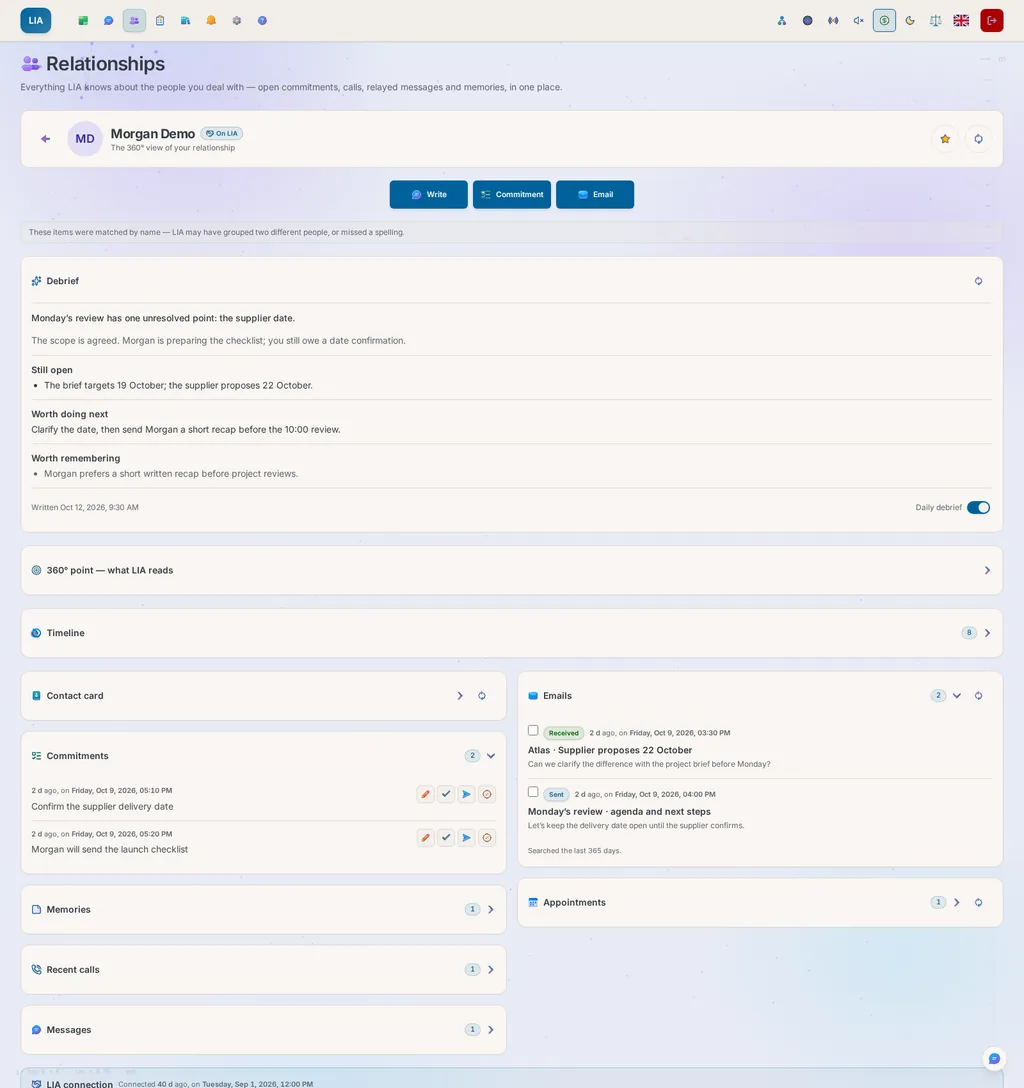
Prepare for your next conversation with the full picture.In Relations, your own small CRM, each card brings together exchanges, remembered facts, calls and open commitments. You prepare your next conversation with what matters for that person, not with a plain contact list.
What makes this possible
Memory helps LIA understand your request, and the connected sources tell her what is happening now. The briefing and the radio each have their own settings for choosing their sources.
Explore the engineering : dual-vector semantic memory · introspective journals · daily briefing · private SMS archive · Psyche Engine (14 moods, 22 emotions, an experience grounded in evidence).
Explore the capabilities
Choose a topic to see what it brings you.
Example request
Remember that I prefer appointments after 10 am.
What you can get
A lasting preference that you can view, correct or delete, and that LIA can recall when a request concerns it.
Your context stays within reach
Contextual memory
LIA keeps your preferences, your relationships and your standing instructions, recalls what concerns your question and can look up a subject that came up along the way. A new instruction is pinned straight away, safe from automatic corrections and clean-up. You can edit it, unpin it or delete it, and bring an export of your memories back in. A fact that changes keeps a dated record of its previous version, and resetting the chat keeps what she has learned for the long term.
Example request
In my journals, I review and correct an observation.
What you can get
Observations and a sourced portrait, with their confidence levels, that can enrich the features that use them.
Your context stays within reach
Personal journals
Over the weeks, LIA keeps her own journals about what she learns of you: observations, rules to respect, recurring patterns, facets of your portrait. Each carries a confidence level that she reassesses on the next turn, depending on whether you confirmed or contradicted it. The portrait that emerges is a reading of you, fed by everything she keeps, from your memories to your kept answers; it cites its sources and goes with you wherever LIA speaks. She checks her journals when a subject comes up. You read them by theme, edit them, flag a mistake or run their consolidation again.
Example request
In Relations, I open Claire’s card before our appointment.
What you can get
The accessible exchanges, memories, calls and commitments, gathered to prepare the next conversation.
Your context stays within reach
Personal CRM
For each person, LIA gathers what she already knows (open commitments, recent calls, remembered facts, exchanges) into an overview that prepares a conversation at a glance. Star your favorites: they keep their own band and never disappear. A badge shows who is also connected to you on LIA. Each card opens on a written debrief (where you stand with that person, what is still pending, what you might bring up), rebuilt at most once a day, when you open it. A timeline lines up everything dated for each person on a single thread, and a first name is enough to ask about someone; if several people share it, LIA asks which one.
Example request
Who texted me yesterday about the delivery?
What you can get
The matching SMS in your archive, with the sender’s name, once you have given LIA access.
The conversation continues between assistants
Your SMS, kept for you
An iPhone Shortcuts automation forwards every SMS your phone receives to a private, encrypted archive, with its own token. There you get search, sender names taken from your contacts, deletion and export. Access codes it recognizes are never stored. LIA reads your SMS only after a separate authorization: a relationship, the day’s briefing or a discussion can then take them into account, and a new message can alert you without showing its content on the lock screen.
Example request
I choose my radio’s sources, then start listening.
What you can get
A broadcast mixes the information about your day that you have authorized with sourced news; the program, the transcript and the cost stay visible.
Your day, on the air
A radio about your day
An on-demand station mixes your day with sourced news, in your language. You choose the programs, the sources, the voices and the checks, and you follow the sources and the cost under a daily budget, until the timer runs out. Commercial offers and sponsorships are filtered out, while invoices, bookings and editorial or scientific news remain useful. The voices sit on top of the station’s music, which steps back when they speak, and in shows where people talk to each other, a little laugh or a sigh can open a line.
Example request
I turn on LIA’s emotional expressions.
What you can get
A simulated mood and expressions accompany the conversation, according to the Psyche engine’s settings.
Your context stays within reach
Living emotional intelligence
A conversation that adapts to the situation: LIA adjusts her vocabulary, pace and humor based on her personality and a model of moods and emotions. This expressive behavior is a simulation, not a human feeling. Depending on the enabled voice capabilities, the intonation of her voice can also follow that tone, within set limits. You get a personalized presence, with the same permissions to act. She also learns, from evidence, where she is reliable (what her answers established, what you found useful), and checks or asks when that evidence is missing.
Example request
I open my dashboard to prepare my day.
What you can get
Your calendar, emails, reminders and other available sources, each showing how fresh it is, with actions close at hand.
The essentials at a glance
Daily briefing
Every morning, your day at a glance, before you even ask: a summary, the weather, your calendar, birthdays, reminders, health, unread emails, received SMS, tracked commitments, overdue tasks, changed documents and the Workboard tickets waiting for you. A new account can start with the weather alone and a short getting-started list, your address first, and you turn on the rest whenever you want. The page opens on the date and LIA’s animated face, and the calendar reads like a timeline. Each card opens an item in its tool, lets you act on the spot (summarize a document, prepare a reply, finish or postpone a task) and shows how fresh it is: how long ago it was updated, served from the cache, or ready to retry in one click. A button reads the whole briefing aloud in a natural voice. Each card appears as soon as it is ready, and loading the page opens your sources only once.
Example request
I keep this answer to find it later.
What you can get
The answer, your request and their date stay in your bookmarks; finding them through search depends on their being indexed.
Answers connected to your sources
Kept answers
An answer worth keeping is kept in one click, with the bookmark on its bubble. LIA copies the answer, the request that produced it and its date: resetting or deleting the conversation changes nothing. Your kept answers have their own tab, export to Markdown and are indexed in a knowledge space of your own: weeks later, LIA cites them when your question concerns them. You can bring one back into any discussion from the “+”, where it joins your message as a copy.
Example request
I choose a more restrained personality for LIA.
What you can get
The tone of the conversation follows the chosen personality, and you can change it in your settings.
Your context stays within reach
14 personalities
Professor, Friend, Philosopher, Cynic, Influencer, Enthusiast, Poet, Coach and more: pick the tone that suits you, and LIA adapts every answer. The personality changes how she says things, never what she is allowed to do. It also governs her voice, in Live and when she calls you, while a call to someone else stays cordial, and each one exists in the six languages of the interface, with the same register.
Example request
I show the animated companion during my conversation.
What you can get
Its face expresses simulated states and emotions, and you control how it looks and how it is displayed.
Your context stays within reach
A face that lives
Choose from the original companions built into LIA, including BIP. Their expressions follow the activity and the tone of the answer, their mouth opens on the voice you actually hear, they play the weather observed where you are, those with arms or feet move them as they listen, think and speak, and their depth is suggested from prepared elements, with a reduced or static mode. The Simli video avatar is still experimental and switches on only when you ask: it goes through a connector and incurs external service costs, even while the connection stays silent.
Example request
What can you do with my calendar, and how do I connect it?
What you can get
LIA draws on her help base to explain her features, their settings and their limits.
Answers connected to your sources
Self-knowledge
Ask her “what can you do with my calendar?” or “how do I turn on voice mode?”: LIA answers from her own knowledge base, the same FAQ as the help center, kept up to date with every release and in your language. Features, configuration, limits: she explains what she can do and what she doesn’t do, instead of making up a reassuring answer.
1 of 11
NOTICES
CHAPTER 04
Pick up the project at the right moment.
An awaited reply, a deadline, a useful signal: routines and proactivity connect what comes in to what you are working on.
My commitment
Fictional example
An already configured routine watches Marc’s new emails about the Atlas committee.
LIA brings the useful context together
Your commitmentsOriginal commitment · 3 pm
Your emailsMarc moves the committee to 2 pm
Your routineConfigured watch · new emails
The change and a reply to review
Watch turned on at your request, at the instance’s pace; the signal doesn’t decide for you.
Illustrative scenario: fictional people, data and outcomes.
A condition, then the right next step.Choose the condition to watch and the work to start. LIA checks the condition at the pace set by the instance, and starts the next step only if it is met.
The alert comes with context.Your available sources, your projects and your interests help LIA make you a useful suggestion. You can adjust this help or turn it off.
Visible follow-up between requests.Reminders, habits, scheduled actions and tickets keep their state in the app: you see what is waiting and what got done.
What makes this possible
A conditional routine checks the rule you set before starting the planned work. Proactivity can also link something new to your context, to put what deserves a decision in front of you at the right time.
On this ticket, I hand LIA the job of preparing the file.
What you can get
LIA works in the chosen mode, comments on her findings and asks on the ticket for the confirmations she needs.
Work followed through to its result
Hand a ticket to LIA
Hand her the ticket: she takes it, does the work in Pipeline, ReAct or automatic mode (your choice, set on the ticket), comments on what she found and gives you back the result to approve. When she runs into something she can’t do alone, she neither gives up nor decides for you: she asks on the ticket, showing what she is about to do, and one comment is enough to answer: yes, no, or what needs to change. She follows up on what is late or left waiting, pointing to what is really waiting.
Example request
From the briefing, I put a watch on the reply I’m expecting from Claire.
What you can get
A routine checks the condition at the pace set by the instance, then starts the next step as soon as it is met.
From the right signal to the next step
Routines that wait for their condition
A routine doesn’t need a fixed time. It can wait for a condition: a task going overdue, an email matching what you are watching for, the weather changing in the next few hours (read from Google Weather), a document added, an event coming up, a public web page that changes, a price for instance. It can also start when another system calls it, at its own address, with a signed request. If you wish, it proposes what it is about to do before acting. From your briefing, you put an awaited email under watch in one tap, by sender. A week view shows all your routines, hours from top to bottom and days from left to right, each cell colored by what actually happened.
Example request
I set the sources and the hours when LIA can offer me help.
What you can get
Suggestions can connect relevant signals to your context, within the limits you set.
From the right signal to the next step
Proactive intelligence
Push notifications at the right moment (weather, meetings, tasks), fed by fourteen sources, each with a switch that shows whether it is connected. Themes rotate so that a subject doesn’t come back day after day, and a notification about an interest cites real, recent facts, with clickable sources. In conversation, LIA makes connections you wouldn’t: forecast rain and a planned outing, an email mentioning an appointment and a clash in your calendar. Everything can be set (time window, pauses, sources), and there is no daily quota: relevance decides, not a counter.
Example request
I allow LIA to start a discussion in the evening.
What you can get
An open question about a project can arrive during your hours, with its reasons visible and four quick reactions.
From the right signal to the next step
Conversations it starts
Beyond notifications that keep you informed, LIA can open a personal discussion on her own, to take an interest in a project, encourage you or ask you an open question, as soon as you allow it. You set her hours, a daily maximum, each source she may read and the sensitive topics she may take into account, and you answer an opening in one click with one of four reactions. What she understood stays visible: you can set aside, delete or rebuild each item, and each run says why it stopped and what it cost, counted in your usage.
Example request
I allow signals from important emails during my proactive hours.
What you can get
A signal can bring forward the moment LIA considers a suggestion, depending on your sources, your pauses and your hours.
From the right signal to the next step
A mail arrives, she decides within minutes
A notification doesn’t wait for the next turn of the clock: when your mailbox or your calendar signals something, LIA can decide within minutes, inside the time window and with the pauses you set, and only for a message carrying a label you consider important or an event that concerns you soon. What can wait becomes a suggestion on your dashboard rather than an alert, and nothing runs without your consent. An activity feed shows everything she did behind the scenes.
Example request
I turn on follow-up after a meeting.
What you can get
A follow-up question can arrive at the planned moment, once the context and your availability have been checked.
From the right signal to the next step
The moment after
A meeting that ends doesn’t go unnoticed: a quarter of an hour later, LIA comes back to you with an open question about what happened, based on two facts at most, without ever judging you, and never during your next meeting. The moment is checked again just before it is sent: a cancelled meeting produces nothing, two back-to-back meetings get just one question, and the same question is never asked twice. Each type of moment can be turned off separately in your settings, and the decision is made on your local time.
Example request
I turn on learning and look at the observed days.
What you can get
Visible statistics pick out the rhythms that enough observations support, and you can pause learning.
From the right signal to the next step
Habit learning, proven
LIA learns your rhythm and your recurring requests from transparent statistics, never from an opaque model. Everything is visible: the heat map of your 24 hours, the progress of a need under observation, the days observed, the thresholds applied. A habit that is shown is proven, otherwise it does not exist, and you can pause, block or forget everything in one click. The feature is off by default. Reading counts as presence (opening the app, giving a notification a thumbs-up), but a notification LIA sent never counts as your activity.
Example request
I look at a confirmed habit, then pause it.
What you can get
Its streak and its progress stay visible, and its status guides how the context can use it.
From the right signal to the next step
Habits that live with you
A confirmed habit shows its streak in the same proven register: the consecutive days kept up, the milestones passed, your record. The status you give it applies everywhere: proposals, timing, the assistant’s context. Every night, a job promotes it, refreshes it or demotes it, never when in doubt — and what you ask for often, whatever the hour, becomes a proposal: a routine ready before you ask. What she learns survives a reset: the reset clears the conversation, not what she learned.
Example request
I create a ticket on my board, with a deadline and its steps.
What you can get
Work tracked by status, assignee, comments and history, with its deadlines visible.
Work followed through to its result
A board for what you actually do
A ticket is not a line in a list: it has a lifecycle, someone who holds it and a result. Seven columns, from a mere idea to finished work, sub-tickets, comments and a history that names both sides of every hand-over. The person holding it can be you, someone connected to you on the same instance, or LIA herself. Priority, due date and lateness show on the card. You sort your tickets into categories of your own, and the board draws a lane for each. Every ticket has its own switch to decide whether the chat talks about it, and an overview at the top of the board counts everything, down to the cost.
Example request
I follow astronomy as a topic and turn on its notifications.
What you can get
Regular searches can bring you sourced news, and you can block a topic or turn off the alerts.
Answers connected to your sources
Interests
Follow the subjects you really care about: a subject you brought up only once never becomes one. LIA regularly looks for relevant content on the web, in the news and on Wikipedia, and sends it to you as a notification. Themes take turns for variety, every notification cites its sources, and a subject you block does not come back. What she read for you is written into your registers, exactly as when she searches during a conversation.
Example request
Every Monday at 8 am, summarize my unread emails.
What you can get
A scheduled routine follows the rhythm you asked for, prepares the result and makes it available to you in the app.
From the right signal to the next step
Reminders & routines
Set reminders in plain language (“remind me tomorrow at 9 am to call Marie”) and routines that work on their own, such as the Monday email summary or the morning weather, whose result is archived and sent to you. Ready-made templates fill the form, a routine can notify you only when it found something new, and it tells you when it failed or missed its time. A reminder can repeat with the same words as a routine: every three days, the second Tuesday of the month, every two hours between 9 am and 5 pm, until a chosen date or number of times, without a clock change ever skipping a day. A reminder that comes due while your quota is reached is put back in the queue, never lost.
Example request
I send my steps with a shortcut and a dedicated token, then open the charts.
What you can get
Your dated measurements and how they change; a rejected value is explained. This is not a diagnosis.
Your measurements, in context
Health data
Send your heart rate and step count from any source (an iPhone shortcut, a watch, a script) to an endpoint protected by its own token, shown only once and revocable. Duplicate measurements across devices are merged, an outlier is rejected with its reason without failing the whole upload, and gaps stay gaps so the charts stay honest. You view them by period, and the Health card of your home page sets each measure on a dial, today and your average side by side.
1 of 12
CONTROL
CHAPTER 05
Delegate the action. Keep the decision.
Before a sensitive send or call, you see what LIA proposes. Afterwards, you find the result and the recorded spend.
A phone call
Fictional example
Call Les Jardins restaurant to ask for a table for two on Thursday at 8 pm, outside if possible.
LIA brings the useful context together
Your calendarFree after 7 pm
Your preferencesTwo · terrace
Your approvalBefore the call
A specific proposal before the call
Try confirming: this demo makes no call.
📞
Les Jardins (Demo)
Callee: Les Jardins (Demo)
Phone: (202) 555-0100
Objective: Ask for a table for two on Thursday at 8 pm, outside if available. Do not accept another time without checking with me.
Draft to review
The call starts only after you confirm, if telephony is configured.
Illustrative scenario: fictional people, data and outcomes.
A real proposal to review.Recipient, content, purpose of the call: you confirm the exact action, and you can touch up the draft before approving.
A proposal is not a result.The actions register and the consultations register show what LIA did and what she read. A failure or a limit stays visible there.
Readable costs and budgets.The calculated tokens and cost appear with the answers. Ceilings can be set for each account and for the instance.
Choose your hosting and models.Host the app yourself and export your data. The external models and services you choose receive the context needed for the requests that go through them.
What makes this possible
You confirm the concrete action: the recipient, the message or the purpose of the call. The registers keep every attempt and its outcome, failures included, so you can find out what happened.
Explore the engineering : Approvals at tool level, editable drafts, action and consultation records, budgets and encryption.
Explore the capabilities
Choose a topic to see what it brings you.
Example request
Prepare this email to Claire and show me the draft before sending it.
What you can get
You check the recipient and the content, then you confirm, edit or decline.
A decision that stays yours
You stay in control
LIA shows the native actions she prepares for your approval: you can inspect the draft, change it or refuse. A task with several drafts presents them one at a time. For MCP, your account, server and tool choices determine the questions; their effect is visible in Settings. The report beneath the answer names what actually ran.
Example request
In my settings, I view my data, then export it.
What you can get
An export to get your information back; keep in mind what the operator can see and which providers were chosen.
A decision that stays yours
Protected data
Credentials and certain fields are encrypted, access to the account is controlled, and your data can be exported. The instance operator can still technically access stored conversations. LIA sends the useful context to the configured providers, which apply their own retention rules and, where relevant, their own training rules. The activity registers can be viewed and exported.
Example request
As the administrator, I set the instance’s ceiling and an account’s budget.
What you can get
Usage and limits stay visible, and the affected requests are blocked when the ceiling is reached.
Numbers you can verify
Usage quotas
Each account has its own ceilings (tokens, messages, cost), tracked in real time. A warning appears at 80% of whichever limit will be reached first; it names that limit and says when it resets. The instance also has its own ceiling for the day, and every call to a model it pays for respects both. Administrators adjust budgets, and block or unblock an account instantly. If you want, every answer shows what it cost.
Example request
I connect the mobile app to my LIA server’s address.
What you can get
Your account and the instance’s features in the mobile app, with your phone’s permissions.
The same thread, across your screens
Native Android and iOS apps
One official app per store, which connects to your own self-hosted server: you type its address once, and every improvement to the web app arrives without a store update. Sign-in, push notifications and connected services work natively. On Android, notifications go through your own Firebase project, never the publisher’s. The app connects to your server, and the external services you have configured receive the context your requests need. If you prefer, the installable PWA does the same from the browser.
1 of 4
Security & Privacy
Data protection is part of LIA’s architecture. The browser does not receive connector credentials: a dedicated backend keeps the tokens in server-side sessions. The context an answer needs may be sent to the chosen model provider, after personal data has been filtered and minimized. Passkeys, the second factor and a step-up confirmation protect your account, and skill code runs in an isolated, throwaway container. Content from a third party stays data to analyze, never an instruction. From design to operation, every version is built on pinned, verified building blocks, then monitored in production.
Data control
Your account data is scoped to your session, and you can export it. You see the connected devices and can revoke them, and the daily backups have a tested restore. Model and service providers may receive the minimum context that the features you turn on need.
Secure architecture
A dedicated backend (BFF pattern), with HTTP-only cookies and Redis sessions: connectors’ OAuth tokens are never exposed to the browser. Passkeys and a TOTP second factor, with re-authentication for certain sensitive account operations, such as managing the second factor or exporting. A strict CSP, coverage of the OWASP Top 10, and third-party code run in a throwaway container, with no socket and offline except toward allowed hosts. A page LIA writes runs in a frame with no origin, under a policy that names no host. A Google sign-in proves an address, never a right: it can neither activate nor unblock an account. Every page LIA reads is fetched at the verified address, redirect after redirect, so none can lead her into an internal network. A client that probes unknown addresses or racks up refused sign-ins is banned for a while by all the server’s workers at once.
Encryption
Connector credentials are encrypted with Fernet and passwords are hashed with bcrypt. A reset link is valid only for one account and one password, each account receives only a few reset emails a day, and the operator can add Cloudflare’s anti-bot check to sign-up, sign-in and reset. Some features give the browser temporary session access or a restricted Google Maps key; the provider’s restrictions and quotas are still needed.
Privacy and GDPR
Pseudonymization, data minimization and the filtering of personal content in technical logs help protect privacy; debug mode can keep more. The export includes readable Markdown, JSON and the files, without the secret credentials. A contact’s photo is redrawn before it leaves, without its GPS tag. The registers show actions, consultations and initiatives: they are transparency tools, not a general certification under the GDPR or the AI Act.
A verified software supply chain
Every building block of the server is pinned by its digest, and every version publishes the exact inventory of what it contains (CycloneDX SBOM). A weekly watch reads each dependency’s security advisories, and an update waits out a cooling-off period and never moves backwards. Before it is published, every version is installed on clean machines, and the code goes through the secret detector before every push.
Monitored operation
In production, metrics, traces and logs keep only facts, never a name or a search. They feed dashboards and alerts, each linked to its resolution procedure. LIA reads these signals herself and diagnoses an incident from a bounded evidence pack, shown to the administrator. The monitoring tools stay on maintained versions.
Regulatory references and open standards
RGPD / GDPR
EU AI Act
MCP 2026-07-28
Agent Plugins 1.0
agentskills.io
OWASP Top 10
WebAuthn / FIDO2
OAuth 2.1 + PKCE
iCalendar (RFC 5545)
CalDAV / CardDAV
vCard
List-Unsubscribe (RFC 8058)
OpenTelemetry
Prometheus / OpenMetrics
CycloneDX SBOM
ISO/IEC 25010
Keep a Changelog
SemVer 2.0
Conventional Commits
WCAG 2.2 AA
Open standards rather than a home-grown protocol: what LIA speaks, another tool can speak too, and what she promises can be checked against a text written by someone else.
Query your knowledge, compare it with the web, and get a comparison, a document or a mini-app that fits what you need.
Organize knowledge with documents and synchronized sources
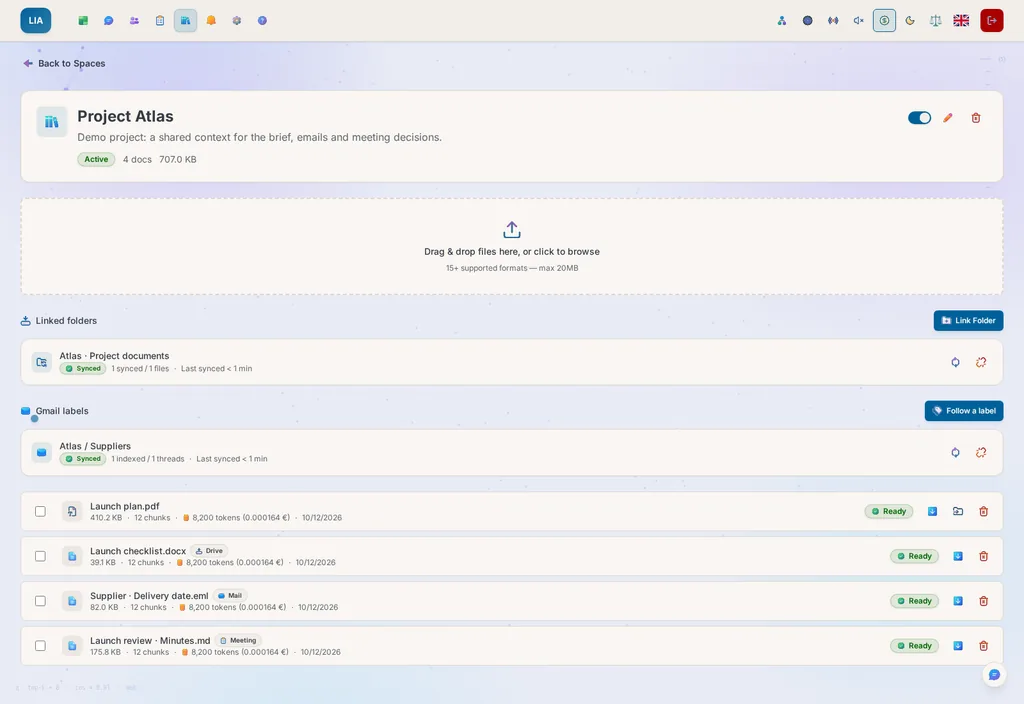
Your knowledge joins the work.Documents, Drive or OneDrive folders and emails synced into your spaces: LIA finds the useful passages and their sources, without you having to copy anything over.
A response takes the right form.A table, a file, a diagram, or a game or a calculator that runs in the chat: information becomes something you can read, use or share.
Add the capabilities you need.Skills, plugins, MCP servers and read-only specialists widen what LIA can do. The code and the interface contracts are documented.
What makes this possible
Knowledge spaces find a passage by its meaning as well as by its words. Specialists can explore several leads in read-only mode, then LIA combines their findings into the deliverable. Skills and plugins then extend what she can do.
Explore the engineering : sandboxed skills with interactive widgets · pages LIA writes and runs in a sealed frame · knowledge spaces (15+ formats, hybrid search) · MCP protocol · open source.
Explore the capabilities
Choose a topic to see what it brings you.
Example request
Explore several leads on this topic and compare their sources.
What you can get
Read-only specialists each work within their own budget, and LIA can bring their findings together.
One request, several coordinated actions
Sub-agents
For in-depth research, an analysis that cross-checks several sources or an expert summary, LIA hands the work to temporary specialists who move forward in parallel, each from their own angle, then she coordinates and summarizes their results. Each sub-agent works in a bounded loop, with an explicit list of allowed tools and its own budget, so a delegation never spirals out of control. Every delegation is written into your registers, like any action of LIA’s.
Example request
In a space, I import my case file, then ask for its termination clauses.
What you can get
The relevant indexed passages come up with their sources, if the space and search are enabled.
Answers connected to your sources
Knowledge spaces
Import your documents in more than 15 formats (PDF, DOCX, PPTX, XLSX, HTML, EPUB…) or sync your Google Drive or OneDrive folders, subfolders included: past a certain threshold, the exact number of files to index is shown before anything starts. LIA extracts, splits and indexes the text, then enriches her answers with a search that is both semantic and keyword-based, citing what she read. Your meeting minutes and kept answers have their own spaces. A document she cannot read, such as a scanned PDF, says so and explains how to fix it. You can pause or delete a space at any time, and nothing is indexed unless you act.
Example request
Create a skill that converts units in a mini-app.
What you can get
A skill offered for installation, which can show a widget and run its commands in the configured sandbox.
Possibilities you can combine
Skills with cards and mini-apps
Give LIA tailor-made skills. Describe one in your own words: the built-in generator writes it and offers it to you, and one click installs it. You can also pick one from the public skills.sh library, after reading it. A skill can show a card, a dashboard or a mini-app in the chat, or run its own commands in a throwaway container and hand you back files. A skill from elsewhere runs in isolation and never touches your connectors. Each skill shows how often you use it, and one you replaced keeps a previous version to restore.
Example request
Make me a quiz on European capitals.
What you can get
The quiz runs in the conversation, with its .html file below it and its code behind a button.
Possibilities you can combine
A page you can use
Ask for a game, a quiz or a calculator: LIA writes it and runs it in the conversation, with no skill to install. Change it in your own words, find its .html file under the answer and its code behind one button; asking for the code still gives you the code. The page runs in a sealed frame that reaches neither your account, nor your data, nor any site of its choosing. It can draw a map from the sources your administrator allows. Reopened from your history, it waits for your click.
Example request
I link the Gmail label “Project” to a knowledge space.
What you can get
Labeled threads become synchronized documents; attachments are named there, not read.
Answers connected to your sources
A space that follows a Gmail label
Choose a Gmail label, and the space follows it: the threads you label become documents you can query weeks later, with the thread’s context. Removing the label in Gmail removes the document. The whole mailbox is never copied, only the threads you picked, and attachments bring only their name, not their content. You archive what matters without moving anything, and you find it again just by asking.
Example request
I open the interactive interface my MCP server offers.
What you can get
The compatible server’s app appears in the chat, with whichever of its interactions are supported.
Possibilities you can combine
Interactive MCP Apps
When a compatible server offers one, its interface appears in the conversation: thanks to the MCP Apps protocol, forms, visualizations and mini-apps can be used right in the chat. Each widget runs in a separate frame, with controlled origins and restricted access. You look at the result and work the tool in the same place. It is available to users and administrators alike, depending on the server and its configuration.
Example request
In my settings, I connect an MCP server suited to my tools.
What you can get
That server’s tools can be added to LIA, within their permissions and their configuration.
Possibilities you can combine
Extensible (MCP)
Add a server from a gallery of known ones, its form already filled, or connect your own. For MCP, you choose confirmations at account, server and tool level. What it will do explains the effective rule before you change it. A dedicated agent asks before its task when one of its tools requires approval; that answer covers its calls for the task. A tool’s “never ask” choice is suspended when its declaration changes. The chat may strengthen these protections; only Settings can reduce them. A routine may use the servers you explicitly pre-approved in its form.
Example request
I install a plugin from its ZIP and check its components.
What you can get
The supported skills and MCP servers are listed with their status, and each skipped item says why.
Possibilities you can combine
Plugins (Agent Plugins standard)
Bundle several capabilities into one package: LIA supports the skills and MCP servers of the Agent Plugins v1 standard. Install a plugin from a ZIP file or an HTTPS link, then see the status of each component: installed, skipped with its reason, or removed. You can later uninstall it from the app. What you can reuse from a plugin depends on what it contains and on the features LIA supports.
Example request
As the administrator: check the disk space and the health of the containers.
What you can get
A diagnosis backed by commands from the configured CLI, reserved for the administrator and limited to their server.
A visible journey, step by step
DevOps CLI (Admin)
For administrators only: diagnose and manage your servers in plain language (Docker logs, container health and resources, disk space, database, restarting a service) through Claude Code CLI, built into the API container, which sees the whole platform. Your operator’s question gets a reasoned answer, backed by the commands that ran, without opening a terminal or leaving LIA. It runs on the model and effort level the administrator sets, with its own access token.
1 of 9
CONNECTS
CHAPTER 07
With family, friends and colleagues.
One server, one assistant per person. Connect the people around you, coordinate your availability and share messages, images or useful tools, with everyone keeping their own space.
Dinner with Sarah
Fictional example
Find a time tomorrow evening to have dinner with Sarah at Les Jardins. Prepare the invitation for me to review.
LIA brings the useful context together
Connected LIASarah · accepted connection, same instance
Approved accessAuthorized availability only
Your calendarYour calendar · free tomorrow at 7:30 pm
Your invitation is ready to review
Accepted connection on the same instance; no general access to Sarah’s data.
Illustrative scenario: fictional people, data and outcomes.
Coordinate with fewer back-and-forth messages.A dinner with friends, a family get-together or a catch-up with colleagues: LIA matches up the shared time slots and the information each person has authorized. To pass on a message, you approve the text, then the other person’s assistant delivers it and reports the outcome back to you.
Useful know-how to pass on.Share an image, a skill, an MCP server or a plugin with an accepted connection. A capability received is a disabled copy, without your connections or your personal credentials, and the person receiving it chooses whether to configure and activate it.
Individual context. A shared instance.Each account keeps its own connectors, memory and preferences. You choose what you share for reading, you see who accesses it and you can withdraw those rights. The administrator keeps control of the server’s accounts, capabilities and budgets.
What makes this possible
Relaying a message, opening read access and sharing a capability are three different acts. For each connection, you define what the other assistant may look at: your time slots, the titles of your events or the titles of your tasks. You approve every relay and every capability share. Withdrawing access stops future reads, but a copy already received stays independent.
Explore the engineering : Rights and blocks checked every time, a log of consultations, relay after approval, a preview of what will be shared, identical to what you confirm, received copies installed disabled, and visible provenance.
Explore the capabilities
Choose a topic to see what it brings you.
Example request
Tell Sam I’m picking up the kids tonight.
What you can get
The message is queued directly for your accepted connection’s assistant on the same instance, without a confirmation card.
The conversation continues between assistants
Your circle, assistant to assistant
Find people on your instance by deliberately searching for their exact name or email address, then accept your connections. Ask LIA to pass on a message: it leaves without a confirmation card, their assistant delivers it, and the outcome comes back to your thread. A reply can be prepared right under the message. For a known connection, a first name is enough; if several people share it, LIA asks you which one.
Example request
Using what Sam has agreed to share, let’s find a slot tomorrow evening.
What you can get
LIA checks the availability Sam has authorized for the coming days; every read is logged, and access can be withdrawn.
The conversation continues between assistants
Read-only shares, revocable
Choose what each connection can read: your availability, the titles of your events if you agree, or the titles of your pending tasks. Access granted on both sides stays visible. Every consultation is checked and written into your access log, and you can withdraw the right whenever you want. Reading does not let the other person change your events or your tasks.
Example request
I share my skill with an accepted connection.
What you can get
You confirm a preview, then the person receives a disabled copy, which they can configure and activate on their side.
Possibilities you can combine
Share your skills, MCP servers and plugins
Pass a skill, an MCP server configuration or a plugin to an accepted connection. You check the sharing preview, then confirm the send. The copy arrives disabled, with its origin, and neither your connections nor your personal credentials are transferred. The person who receives it can review it, add their own configuration and choose to activate it. Once activated, the capability keeps its usual powers: that choice is theirs.
Example request
On my MCP server, I check who I shared it with.
What you can get
The recipients and dates of your shares; on the other side, the received copy shows where it came from.
A decision that stays yours
Who sent what, and who you shared it with
A received copy shows who sent it and the date it was shared. On your own items, you find the recipients, the dates and any incomplete sends. Each person sees their own side of the share. A received copy evolves independently of the original, and changes are not synced. For now, an item already delivered to someone cannot be shared with them a second time.
Example request
I share this image with Marie and add a note.
What you can get
Once you confirm, a copy goes to her gallery and her chat, with your comment quoted.
Your idea takes shape
An image to give
From a generated image that belongs to you, choose an accepted connection and confirm the share, with a comment if you like. A copy goes into their gallery, and the notification in their chat quotes your comment exactly as written. The copy has its own lifetime, and the share itself calls no model. Delivery to the gallery and the notification each have their own status.
Example request
Inside the World, I look at my connections directory.
What you can get
The general status of your accepted, unblocked connections, without their private data.
The conversation continues between assistants
Find your circle in the World
In LIA World, the directory of your accepted, unblocked connections shows each one’s general presence: in the world, in their private home, away or offline. This status comes from their connection to the World: it reveals neither their position in the scene nor what is in their home. Encounters and discussions in the shared world are covered in the next chapter.
Example request
In my connections, I block someone.
What you can get
Blocking cuts off access without telling that person, and unblocking them does not restore the shares.
A decision that stays yours
Protection by construction
Being findable is a choice, and every connection has to be accepted. Blocking someone cuts off discovery, exchanges and the access concerned, and unblocking does not restore the old rights. Your conversations, connectors and memories stay specific to your account. A right to view can be withdrawn, but a capability already delivered becomes the independent copy of the person who received it.
1 of 7
When LIA World is available, its directory also shows you your accepted connections and their general presence. Discover LIA World
EXPLORES
CHAPTER 08
Step into LIA’s world.
A house to explore, a garden to take a break in, people to meet. LIA comes along with you, and the features you know are a few steps from your home, which stays private.
LIA World · a shared house and garden, your avatar and companion.
LIA beside you.Call her over, let her follow and open your personal conversation without leaving the world. Your knowledge awaits in the library, your meetings in their room and your creations in the multimedia studio.
A world in step with your day.Day and night follow your local time, and rain, snow or sunny spells reflect the recent weather LIA already knows, when she has it. From the garden to the cafeteria, each place has its own soundscape, at the volume you choose.
Together, with room for privacy.Meet the people who are there, write privately or join the public discussion. Have a message translated if you like, and personalize your character and your home’s colors. Your documents, your memory and your conversation with LIA stay private.
What makes this possible
The library opens your knowledge, the engineering lab your skills and extensions, the divination room your routines and the multimedia studio your creations. The Functions directory gives access to the other activities of your account. Every entrance keeps its rights and confirmations.
Explore the engineering : Canvas 2D in your browser, shared presence checked by the server, panels specific to your account, and private messages. Moving around calls no model, and translations go through the usual quotas and cost register.
Explore the capabilities
Choose a topic to see what it brings you.
Example request
I enter LIA World and head to the library.
What you can get
A shared place in isometric view, with your avatar and LIA; the library opens your private knowledge tools.
Shared places, personal tools
LIA World
Explore a house and its garden in isometric view, with your avatar and LIA beside you. The minimap, the keyboard and the touch controls help you get from one place to another. Each room opens LIA’s usual features in private, and walking in sends no message and starts no action. Availability depends on your instance’s settings.
Example request
I call LIA over, then open our conversation.
What you can get
Your personal conversation, her journal, her psyche and your alerts stay close at hand.
Shared places, personal tools
LIA stays close
Call LIA over, let her follow you or wander off, then open your personal conversation with her. Her menu also gives access to her journal, her psyche and your alerts. Her animated presence and movements use no model, and your exchanges rely on the voice and chat features available on your account.
Example request
I go to the divination room to find my routines.
What you can get
Your scheduled actions open in their usual panel, with your account’s rights and confirmations.
Shared places, personal tools
Familiar tools, familiar places
Library, meeting room, multimedia studio, engineering lab, divination room… each place opens one of your usual activities in private. The Functions directory finds your authorized knowledge, memories, meetings, Relations, Workboard, reminders, routines, files and extensions. Shortcuts prepare your requests, but sending and sensitive actions keep their approval step. Administration stays in the usual settings.
Example request
I look at the sky and open the weather panel.
What you can get
The local time and the recent real weather already in the cache bring the scene to life, with no new lookup just for atmosphere.
Shared places, personal tools
The time and weather of your day
The light follows your account’s time, synced with the server clock. When LIA has real, recent weather in its cache, the scene picks up its sunny spells, rain, snow or mist. The weather panel shows you that context. Without fresh data, the scene stays neutral: the atmosphere triggers no weather lookup and no model call.
Example request
I move by touch, zoom and recenter my character.
What you can get
Controls suited to your screen, a joystick if you want one, and settings for quality and motion.
Shared places, personal tools
Move at your own pace
Walk with the keyboard, click or tap the ground, or use the mobile joystick if you like. Look around with the camera, zoom, and find your character again with the minimap and the recenter button. The seats and resting spots placed around the world offer you their poses when you get close. The help brings together the controls, graphics quality and observed performance, and “reduced motion” mode limits decorative animations.
Example request
The world is full: I join the queue.
What you can get
You are offered a place when one frees up, and you confirm before entering.
Shared places, personal tools
A shared world with clear controls
The operator decides whether the world is open and how many people it holds. When it is full, a queue offers you a place to confirm. To move to another tab, you have to take over there explicitly, and a dropped connection pauses interactions while it reconnects. Leaving the world frees your place without signing you out of LIA. Blocks apply to the people you see and to exchanges.
Example request
I choose my avatar’s look and try out colors for my home.
What you can get
Your visual choices stay tied to your account; what is in your home and your assistant’s context stay private.
Shared places, personal tools
Your own corner of the world
Choose how your avatar looks and the colors of your private home. When you enter, you decide whether to agree to show your name and avatar to the other unblocked participants. Your accepted connections also see your general presence, and whether you are at home. What is in your home, your documents and your assistant’s context stay private.
Example request
I write to one participant, or deliberately choose Everyone.
What you can get
You always know who you are writing to. Translation needs explicit consent, keeps the original available and shows the cost to the person who pays.
Shared places, personal tools
People, messages and languages
Write privately to an available, unblocked participant, or choose Everyone to talk to the people present in the shared areas. Translation is a paid, explicit choice: the original stays available, and the cost stays private to the person who pays. These temporary texts stay apart from LIA’s conversation and memory, and a failed or uncertain translation is not retried automatically.
Example request
I wave to the person next to me.
What you can get
The gesture shows above your avatar for a few seconds, and if it is refused, you are told why.
Shared places, personal tools
A gesture says hello
Wave, say thanks, applaud, laugh, ask or celebrate: six gestures appear above your avatar for the people who can see you. The server confirms each one at a calm pace and lets you know when one is refused. Gestures stay out of your private home and call no AI model.
Example request
I challenge the computer to a game of Reversi.
What you can get
The board comes from the server, every move is confirmed, and the computer plays without any AI model.
Shared places, personal tools
Play together at the arcade
Three arcade cabinets offer tic-tac-toe, four-in-a-row and Reversi, against another person or against the computer. The host accepts who joins, the server confirms every move and every result, and a rematch swaps the colors. The computer is a bounded search, not an AI model, and your games leave no history.
Example request
I take a photo of my avatar by the fountain.
What you can get
A private JPEG with only your avatar, LIA and the scenery, ready to download or share.
Shared places, personal tools
Keep the moment
The Photo feature draws a private picture of your avatar, LIA and the scenery, never including other visitors, names, bubbles or private panels. Preview it, download it as a size-limited JPEG signed LIA World, or share it if your device allows. Nothing is sent to a server and no model is called.
Example request
I sit down at the café table.
What you can get
LIA asks whether she should open your dashboard; you can stay seated, and nothing is loaded.
Shared places, personal tools
Your dashboard at a table
Sit down at an ordinary table and LIA offers to open your full dashboard: briefing, radio, results and usage. Stay seated to decline, with nothing loaded and nothing billed, or accept to open it in private, with its usual costs. Familiar objects also show you the reminders that have gone off, your messages and your tickets, for your eyes only.
Example request
I turn on the room sounds and set their volume.
What you can get
Original sounds, stored locally, follow the room you are in and fade out for the voice and the Radio, without calling any provider during playback.
Shared places, personal tools
A world you can listen to
Turn on the soundscapes of the rooms and the garden if you like, with their own volume. These original sounds, fixed in advance, call no provider when they play. The library stays silent, and the world’s sounds fade out for LIA’s voice, the microphone, Live mode and the Radio. They stop when you leave.
1 of 13
The places, and what you find there
Push a door open, walk up to an object or go through the Functions directory. The shared areas welcome everyone, but the tools you open stay personal.
Social atrium
Meet by the fountain and benches; the connections board opens your links with other people.
Meeting room
From the meeting table, you find your meetings, their recordings and their minutes, just as in the app.
Multimedia studio
The drawing table prepares an image request; your images, documents, screenshots and kept answers live in their galleries.
Phone booth
Prepare a call, find its history and the mail shortcuts; sending keeps the usual confirmations.
Memory archives
The archives open LIA’s memories: inspect, correct or delete what your assistant retains.
American diner
The reading desk leads to news; the jukebox opens your personal Radio. Booths offer somewhere to pause.
Engineering lab
Skills, MCP servers, plugins and task shortcuts are in this place’s directory.
Gym
Habits and health measurements have their own panels, and the equipment gives access to the activities set up there.
Divination room
The crystal opens routines and the telescope weather; the directory also offers calendar and scheduling shortcuts.
Library
The shelves open your knowledge spaces and documents, with the same sources and access as the application.
Restroom
Private access to your SMS through the authored object and this place’s function directory.
Garden
Your interests, a walk among trees and the pond; seats let you pause near LIA or other people.
Terrace
An outdoor place to meet or rest, with seats and an atmosphere that follows the time of day.
Theatre
A pavilion for privately rehearsing a difficult conversation, then reviewing the dialogue and Theatre feedback.
My studio
Your private space: colour palette, avatar mirror, Relations, Workboard, reminders and commitments. Its contents remain yours.
The features on offer depend on the services and capabilities enabled for your account. Shortcuts open your usual tools, with their permissions, costs and confirmations.
And everything else, obviously.
Your emails, calendar, contacts, tasks and files feed one personal context. Connect Google, Apple or Microsoft, depending on the services available: LIA can match this information with your preferences, your commitments and your knowledge to help you, in one place.
✉️ Emails
📅 Calendar
👥 Contacts
☑️ Tasks
📂 Files, Drive & OneDrive
🌦️ Weather
🗺️ Places & routes
🔎 Web search
📎 Photos & documents analysed
🎙️ Voice — in your language
🌍 6 UI languages
📱 PWA · Telegram · push
🎨 Themes & dark mode
Explore the capabilities
Choose a topic to see what it brings you.
Example request
Find a place near my home and a route to get there.
What you can get
Search, places and routes depend on the configured services, your access and the information available.
Answers connected to your sources
Search, places & routes
Bring your context and public information together: search across several sources with Brave, Perplexity and Wikipedia, or with the instance’s own web search when you have no key, reading of accessible, supported public pages, nearby places, and routes by car, on foot, by bike or by public transport. With your consent, a saved location can help local answers while you are on the move, and how old it is stays visible. Search, places, routes and weather depend on the services configured on the instance, your access and the data provided. When an answer lists places, a Position card numbers them on a single map, and choosing one shows the details already gathered along with a billed route from where you are.
Example request
In Connectors, I link my calendar and my mailbox.
What you can get
LIA uses the services you have authorized, with one provider per family, and you can disconnect them one by one.
Possibilities you can combine
Google, Apple iCloud & Microsoft 365
Connect what you already use, one provider per family: mail, calendar and contacts at Google, Apple or Microsoft, tasks at Google or Microsoft, files on Google Drive or OneDrive. One consent covers several Google or Microsoft services, you disconnect them one by one, and you ask in the same words wherever the data lives. Outlook’s automatic replies and rules stand beside Gmail’s vacation responder and filters.
Example request
I link Telegram to my account and send a voice message.
What you can get
The enabled channel puts you in touch with your assistant and its context, with the supported confirmations.
The same thread, across your screens
Web, Telegram & push
One LIA, whatever the channel: the browser, the Android and iOS apps, Telegram (text or voice message, linked with a simple code) and push notifications on your phone. An external channel is not a cut-down version: memory, journals, personality and emotional state apply there the same way, and your conversations follow you everywhere. Even the phone: LIA calls you, and what you say comes back into the chat.
Example request
I dictate my request, then listen to LIA’s answer.
What you can get
Transcription and reading aloud use the enabled engines; local detection of the French wake word is still in beta.
A conversation you can speak
Voice, transcription and local wake word
Talk to her through local or remote transcription (the remote engine is named), and listen to LIA in the male or female voice you choose from the engine’s voices, limited to your language if you wish. Five speech engines are offered, including Fish Audio, and some can perform sighs and laughs. The French wake word is detected in the browser and is still in beta. An experimental Simli face can accompany voice comments and Live mode, on your key and after you switch it on explicitly; Simli can eat into your plan during silences.
Example request
What weather and air quality can I expect for my outing tomorrow?
What you can get
The forecasts and indices provided by the configured sources, with whatever is available for that place.
Prepare for your next outing
Weather, air quality and pollen
Plan an outing with the forecast and, when the source provides them, air quality and pollen in season. The categories shown are the service’s own, including the local index where there is one. This information can appear in the chat card, the forecasts, the briefing or a place’s details, and a notification you have authorized can warn you. Its availability, and any keys it may need, depend on the instance’s configuration and the enabled sources.
Example request
I attach an image and ask LIA to explain it to me.
What you can get
LIA reads the image attached to your request, within the limits of the supported formats and sizes and of what the available model can do.
Answers connected to your sources
Photos & attachments
Attach photos and documents (PDF, Word, Excel, PowerPoint and more) to your messages with the 📎 button, by drag and drop, or by pasting a screenshot with Ctrl+V: images are compressed in your browser before they leave. The “+” also offers every document in your knowledge spaces, even from a paused space, as a copy for that message. A vision model reads the images, the text of documents is extracted, and LIA reasons over their content. She also reads the attachments of your emails when you ask her to. The files she produces have their own gallery, and each card shows how long the file is kept, or that you chose to keep it. Resetting a discussion removes what you sent there, never what she made.
Example request
I choose French for the interface and for the answers I get.
What you can get
The interface and generated content follow your language, as far as the models in use allow.
A conversation you can speak
Multilingual
The interface, the help, the guides, the personalities and the minutes templates exist in six languages: French, English, German, Spanish, Italian and Chinese. LIA has no trouble reading an email or a page written in another language, and answers you in yours, in writing and by voice. You choose your language once: notifications, the briefing, minutes and the documents she writes follow it, with nothing to reconfigure.
Example request
I install the PWA and open my board on my phone.
What you can get
An interface made for small screens; offline, a page tells you the server can’t be reached.
The same thread, across your screens
PWA & responsive design
Install LIA from a compatible browser and reach your server on mobile. The cache lets you view some things offline, but conversations, syncing and actions need the network. Sharing and notifications depend on the system and its permissions. On a phone, a table, a card or code takes up the full width of the conversation, and an empty card on the home page shrinks to a single sentence.
Example request
I search the settings for “memory” and pin the section.
What you can get
You find the setting through search, and pinned sections stay within reach in the dock.
Possibilities you can combine
Simple in a few clicks
Find your settings by their name or a synonym, in your language, then pin your favorite sections in a floating dock on the dashboard. The capabilities map shows what is active on your instance and where to set it. Connectors ask you for the access they need to link your services. Day to day, everything happens in the interface; hosting and some optional services need configuration by the operator.
You can also ask for your settings in your own words: LIA reads the active mode, prepares the changes that are allowed and uses the interface’s own labels. Small reversible settings can be applied directly, and sensitive operations keep their confirmation.
Example request
I choose a dark theme and a more comfortable text size.
What you can get
The colors, the background and readability adapt to your preferences, which are saved on your account.
The same thread, across your screens
Customisable
Choose the colors, light, dark or black mode, or light by day and black at the hours you choose, one of three icon styles, the font and the text size, then a visual companion and LIA’s tone. Your account preferences and this browser’s display choices don’t have the same scope: the companion’s style and position stay specific to the browser. A color is never the only sign of a state or an alert.
1 of 10
PROOF
LIA has nothing to hide.
Inspect costs, registers and code. Choose your infrastructure and the providers you entrust with your requests.
Every message: 🟠 1 240 IN🟢 210 OUT· 0,003 €
A fictional example of the counter: the cost is calculated from the configured models and rates, and varies from one request to the next.
Costs become visible
Tokens, cache and cost are calculated in the conversation, with budgets per user and for the instance. External services are still billed by their own providers.
A public audit, including its limits
The method, the findings and the points to improve are published, and each finding is tracked in a public register until its proof is recorded. You can examine that evidence, but the report is not a certification.
Before the meeting, you ask where things stand with the client: the latest exchanges, the quote and the meeting decisions are gathered, with the questions still open.
“Suggest two slots and keep my Wednesday free.” LIA puts your remembered preference together with your calendar, then prepares an email you can correct.
Your routine spots the supplier’s reply and starts the planned follow-up: compare the new proposal with the file and summarize the differences for you.
The ticket handed to LIA holds her research, her result and what she needs from you. You pick up the thread without starting over.
You start the radio while making breakfast: your calendar, the promises to keep and the news you chose make up your personal news bulletin.
“Find a time with Marie.” On the same server, LIA matches your shared availability against hers and prepares a proposal. You choose what her assistant receives.
For Saturday, LIA finds your preferences and the possible times. You approve the purpose of the call to the restaurant, and she comes back with the outcome and, if there are any, the options for you to decide on.
“What did we decide about the holidays?” LIA brings together your imported notes and the available exchanges, then prepares a list of what is still to be settled.
“Prepare the project update.” LIA brings together the specifications in your space and the latest minutes: the decisions made, the open questions, the leads to look into.
You hand a technical comparison to read-only specialists. Their research comes back as a summary, with its sources and limits, and you can discuss it.
From what was found, you ask for an architecture note and a comparison table. The files appear in the chat, ready to review and share.
A need keeps coming back: you describe a skill suited to your work. LIA writes it and offers it to you, one click installs it, and for a later tweak, the card shows what changes before replacing the old version.
You open usage and the registers: where the budget goes, which actions were carried out, which capabilities were consulted. You look at the activity starting from facts.
“Why did it restart?” With authorized DevOps access, LIA examines the available evidence, separates what she observes from what she assumes, and says what is still missing to reach a conclusion.
Based on the observed usage, you adjust the budgets in the administration. The limits apply to the calls concerned, and a refusal says when the resource will be available again.
With your usage export and your operations notes, you ask for a summary of the discrepancies. LIA prepares a note and flags what is missing.
A simple interface. Serious operations.
For your family, your team or your friends: a web app where everyone has their own account, with the tools to understand how it works and to step in.
What the operator can see
01 / 03
Grafana: instance and container resources
LIA’s Grafana screenshots: instance resources, token usage, costs and cache. More than 30 complete dashboards.
One server for several people
Each person has their own account, connectors, memory and preferences. You manage users and capabilities from the interface.
Your models and limits
Choose the models role by role, use Ollama locally and set the budgets for the instance and for each account. Optional services are configured to suit your needs.
Grafana dashboards shipped with LIA
Costs and tokens, latency, errors, Pipeline and ReAct modes, confirmations, connectors and infrastructure: the dashboards show you how the instance is running.
Signals to act in time
Prometheus, Grafana, Loki, Tempo and Alertmanager bring together metrics, logs, traces and alert rules. You choose the recipients and the services of this stack to suit your deployment.
A foundation for your internal company assistant.
Preparing meetings, finding business knowledge, keeping track of commitments: these uses can help your colleagues too. The multi-user web app, the connectors, MCP, the APIs and the observability stack form a foundation to customize and integrate into your environment.
Adapt the sources, permissions and usage rules to your organization. Identity, business integrations and hosting still have to be defined for your deployment, and the open code and the documentation help you scope that work.
Finding the right context, organising the work, checking the result: every design choice should make your life easier.
Connect the context
Relevant passages from your documents come together with your exchanges and remembered facts.
Less to explain again.
Organise the work
LIA divides the research and connects the steps that depend on one another.
An intention becomes a result.
Check what comes back
She can refine a search, try another source and flag what remains unfound.
Conclusions you can examine.
Make actions clear
Proposals, approvals and results each keep their place.
You know where the work stands.
Explore the engineering choices
LIA links semantic routing with the tools and sources relevant to your request. For a task to carry out, Pipeline mode prepares a plan and checks it; ReAct mode moves forward through searches and adjustments. Choose the mode yourself, or let Automatic decide for each request. The whole path is measured end to end, from token to euro, with email alerts on the vital signs.
Behind the interface, there is Bayesian plan learning, dual-vector semantic memory, hybrid BM25 and embeddings search over your documents, and a LangGraph state machine whose every step is saved in PostgreSQL. All of it can be self-hosted, down to a Raspberry Pi.
LIA gives the model the information its tools retrieved, with instructions to tell facts, sources and gaps apart. When ReAct mode declares that it is missing something, it gets a limited recovery pass. The registers let you examine what was consulted and what was done. An answer can still be incomplete or wrong: you can check its sources and correct its conclusions.
What runs is isolated from what runs it: a skill’s code runs in a container created for a single call, with no socket, no network beyond the allowed hosts, and read-only. If that sandbox cannot be built, nothing runs.
The chat can read preferences and prepare operations on LIA’s resources, within the catalogue actually on offer. Each operation declares its parameters, its results, the interface sections concerned, the rights it requires and its confirmation rule. The values offered reuse the form’s choices and labels: the model doesn’t invent an option that doesn’t exist.
Registers of acts, consultations and initiatives
Three registers answer three different questions and are never mixed: what the assistant did, with the outcome and your confirmation; what it consulted to answer you; and what it undertook on its own. A consultation records the capability used, “your calendar”, never what was searched for. An action is written down before it happens and closed only on an explicit result: nothing is presented as done just because no error came back. The assistant also uses them to answer you: asked “what did you do this week?”, it counts instead of remembering. The three registers belong to you, can be read in the app, export whole with the exact total at the top, and disappear with your account.
One vocabulary across your data
A contact, an email, an event, a file, a place: each one has the same name everywhere, with a shared vocabulary of thirty-one terms rather than one vocabulary per integration. That is what lets a question cross sources: the person in an email is the same as the one in your calendar and your notes. The links between these items have a declared type and meaning, so the assistant reasons about relationships instead of guessing from names that look alike. And the vocabulary a new capability brings is checked at start-up, never discovered in use.
Native Shells & Wake Relay
One app per store, which connects to any self-hosted server: the WebView loads your server’s address with the same httpOnly-cookie session as the web. On Android, the app talks to your own Firebase project at runtime. On iOS, it is woken by a stateless relay whose identifier is itself the device’s sealed token: nothing is stored, nothing can be read along the way. Sharing and notifications open existing web pages instead of duplicating the interface.
Forgetting really means forgetting
Everything the assistant keeps declares what it is: a conversation, a cache, something learned, something in progress. Every operation reads that declaration instead of guessing from a name. So clearing a conversation clears a conversation: what LIA learned about you stays, and anything whose nature is uncertain is kept and counted rather than deleted on a mere guess. The rule holds the other way too: only “Forget everything” and deleting the account remove what was learned.
Structured minutes
Thirty formats for meeting minutes ship with LIA, from a decision log to a one-page summary, and you can add your own. The right format is chosen from the most explicit signal available: what you asked for, then the meeting’s settings, then your preferences. Failing those, a model reads an excerpt, and it abstains rather than guessing when it is not sure enough. What decided the choice is noted on the meeting. A long transcript is rewritten section by section, so a two-hour meeting is never cut short to fit into a single answer.
Two ways to carry out a request
You choose the mode in the chat header, or let LIA choose it for each request. For a structured request, Pipeline mode prepares a plan, checks that it holds together, then runs the independent steps in parallel: it is fast, controlled and predictable. For an open question, ReAct mode explores, reads the results and adapts what comes next. To stay reliable, it checks that the results really answer the question, can switch source when it hits an obstacle, and says what it did not find, with what it tried. In both modes, confirmations depend on the planned actions. In ReAct, your exchange rhythm can favor the cache if you exchange often (the next turn reuses the beginning of the previous one, for an hour at most while you wait for the answer, with the providers that allow it), or tool selection if you exchange only now and then. The turn ends on the result and its limits, without announcing work that won’t be done.
Seven model providers, your choice
OpenAI, Anthropic, Google, DeepSeek, Qwen, Perplexity and any local model with Ollama. Each role (routing, planning, answering, vision, indexing) is configured separately, so a cheap model handles the mechanical steps and a powerful one writes the answer. What each model can really do is read from a catalogue kept up to date, rather than assumed, and the depth of reasoning requested is translated into each provider’s own language.
Plans that improve with use
LIA remembers which plan shapes worked for which kind of request and reuses them, with a Bayesian score that goes up with each success and decays over time: an old habit never outweighs a recent failure. The effect is practical rather than magical: fewer model calls, faster answers and steadier behavior on what you ask for often. Nothing is shared between accounts: this learning is yours, and it disappears with your data.
Hybrid search
In your knowledge spaces, relevance is decided on meaning rather than on words, with a single multilingual similarity threshold, recalibrated across the six languages. Exact matching keeps a useful role, putting a word-for-word occurrence first when two results are almost tied, but as a limited bonus, never as the judge: giving both signals equal weight would throw out one good answer in three whenever the question is not in the documents’ language. Scripts written without spaces are split into pairs of characters; otherwise a whole Chinese sentence would count as a single word.
Real-time streaming
The answer in progress streams the routing, the planning, the tools and the text as it runs. If the connection drops, generation carries on on the server, and what it produced is replayed to you as soon as you reconnect. Alongside that, every change saved in a conversation sends a signal with no content: the browser re-reads the authenticated history and adds the new rows, without replacing pages already loaded or moving where you are reading. On reconnection, missed signals are caught up. One answer runs per account at a time, held by a database row that no timeout releases, and a message written meanwhile waits its turn on the server.
Honest enrichments
A provider sometimes publishes a category without a number: the French air-quality index says “Moyen” with no value, while Google’s universal index runs the opposite way to the US scale (there, 100 means excellent). So the weather card and a place’s details share a single display, which follows two rules: the category shown is always the one the source publishes, never one deduced from a number, and a number is never shown with the label of another scale. Better an absent signal than a false one.
Exact where it must be
Calculations, dates and currencies are never left to a model’s intuition. A calculation is parsed, then evaluated in exact decimal, never executed as code, and LIA says when the result had to be rounded. A duration is counted between two absolute instants: a night with a clock change lasts 23 or 25 hours, as in real life. A time you say reaches your calendar with its zone, and each message carries the moment it was written: « tomorrow », said on a Tuesday, is still Wednesday on the Friday. A conversion uses the European Central Bank’s reference rate and gives its date. Every limit a tool enforces is written into the description the model reads: whatever is refused had been announced.
A decision with boundaries
An administrator can turn on each use of JEV separately, with optional, bounded diagnostics. The model helps choose, but permissions, compatibility rules and confirmations stay in the code. When in doubt, LIA falls back to deterministic protections, and paid attempts are counted, as are their fallbacks.
Modern stack
FastAPI, Next.js, React, TailwindCSS, PostgreSQL, Redis. Strict TypeScript on the frontend, asynchronous Python on the backend. An installable PWA: six translated manifests, sharing from the system into the chat, an offline page and smart file caching, with API responses never cached. Settings can be searched from the keyboard, in all six languages, ignoring capitals, accents and typographic apostrophes. The design system is a contract checked by tests: every color pair is checked across five themes, in light and dark, with one tone per status and one shape per level of action.
Skills with frames & images
A skill is a small program LIA can write for you, then run in a sandbox. It answers with text, an image or a mini-interface built into the conversation, isolated from the page and matched to your theme and language, and it can run its own commands in a throwaway copy of its folder to hand you files. Whether you upload it, the chat proposes it or you pick it from a public library, every skill follows the same path: strict validation, capped sizes, and an installation that either succeeds completely or leaves nothing behind. A skill written elsewhere is kept away from your connectors.
Human-in-the-Loop
Confirmations sit at the tool level, depending on the planned action. An ambiguity can be cleared up with a question, a draft touched up before approval, and several operations grouped for a single approval when their scope allows. What is proposed and what was done stay distinct, and both leave a trace.
LIA on the phone
LIA can call and be called: your speech is transcribed, the answer is put together, then the text becomes a voice again, in the same conversation as the chat. She has access to the same capabilities, your calendar, your contacts, your reminders, and an action that would need a confirmation is asked about out loud rather than carried out in silence. A call leaves the same trace in your registers as a written exchange: what is done by voice is no less accounted for than what is typed.
Two ways to reach the result
A direct path for structured requests, an adaptive exploration for open questions. You choose the mode in the chat.
Pipeline
Speed and control
The default mode organizes the work before carrying it out. A clear path, with coordinated steps.
1
Plan
Your request becomes a plan of steps and dependencies.
2
Check the plan
LIA checks the consistency of the planned steps and tools.
3
Execute in the right order
Independent steps run in parallel. The others wait for the results they need.
Useful, for example, for
Finding an invoice, drafting a reply and creating a reminder.
ReAct
Exploration and adaptation
When the next step depends on what is discovered, LIA chooses its next move from the results it receives.
1
Explore
LIA chooses an initial search or action based on your request.
2
Observe
It reads what comes back before deciding what to do next.
3
Adapt the next step
It adjusts its search and can revisit a missing point, within a bounded budget.
Useful, for example, for
Comparing solutions, cross-checking sources and resolving a discrepancy.
In both modes, reasons to trust the work
You decide before the action
Actions that require your confirmation ask for it before they run.
The work stays traceable
Consultations and actions have their own separate records.
The result matters
The answer draws on what was obtained and states what still needs clarification.
Every release is told in plain words: what changes for you, not what changes in the code. Here are the latest ones, and the whole history is one click away.
v5.1.0 — 🧭 The right mode, wherever you talk
November 16, 2026
•🧭 Automatic mode — Choose Automatic in the chat header: LIA picks Pipeline or ReAct for each request, favouring the loop when the work needs exploration or an action. When LIA chooses an engine, its badge appears below the answer as soon as it finishes and stays in the history, including when Telegram is active. Tickets, routines and Telegram offer the same choice; the menu says when the instance cannot choose automatically.
•📎 Telegram reads more — Send photos, documents, albums or your location, and reply to a message to give LIA its context. Answers keep their headings, lists, tables and quotes; generated images and documents arrive as files. The chat's file limits still apply.
•⏯️ Telegram keeps your place — /stop stops an answer; a text sent while LIA works waits for its turn. If the answer fails or is stopped, you can send or withdraw the waiting text. With spoken replies enabled, a voice note also gets a voice reply. Routine results reach Telegram too.
•📲 Notifications through ntfy — Subscribe the ntfy app on your phone or computer to your instance's server, or another allowed server. A QR code and a test message help you connect. By default, only a notice leaves LIA; Full text is your choice for each subscription.
•⏰ A reminder can wait — When it rings, postpone that occurrence from its message or notification, or confirm that you want to stop the series. The offered times follow your timezone, and pressing twice from two devices does not create two postponed reminders.
•🖋️ Your words, your choice — Writing style is learned only when you ask, from Settings or a confirmed chat request. You can learn it again or forget it; it no longer renews itself. E-mails LIA writes use that style, while words you dictate explicitly stay as you gave them.
•💬 Results return to their discussion — Calls, meetings started or imported from a discussion, and routines run manually from its chat return there, or to Main if that discussion was reset or deleted. A notification for another discussion names it and offers to open it.
•✉️ Read the e-mail as it was sent — Open its original layout from the chat card, as in Tools, without a model call. Remote images wait for your click. When LIA summarises the mail or turns it into an event, it reads the words that layout actually shows.
•💓 Health figures follow your day — Overlapping iPhone and Apple Watch step samples are counted once per time slice, including history already received. Charts, averages and requested periods follow your account's timezone; a day without samples is not shown as zero.
•📅 Read across your lists — Availability, the home page and other calendar summaries read every calendar you own. Internal readers follow provider pages for calendars, task lists and mail history; a single tool request that reaches its limit says so.
•🧠 A longer conversation keeps its bearings — Compaction preserves recent words you wrote and important identifiers. If a model refuses a conversation that no longer fits, LIA compacts it and tries once more only when the turn has not already carried out an action.
•🧩 Restore through the chat — Attach a memory export and ask LIA to import it, or ask to restore a skill's previous version. LIA shows what will change and waits for confirmation, rechecking that the record has not changed meanwhile.
•📇 Calls and texts on a contact's card — Recent calls and incoming SMS appear even for a contact with only a phone number. After a call, LIA distinguishes voicemail, no answer and a failed line, and says whether a voicemail message was left when the provider recorded it.
•🔌 Stripe in Known MCPs — Add Stripe from the ready-made server gallery. OAuth discovery also reads the metadata published under a server's path, allowing connections that previously failed at sign-in.
•📱 Small-screen fixes — Dialogs and long file or discussion names stay within the screen. The home page's unread-mail label describes the count actually shown, and an answer's mode badge wraps as a whole on narrow phones.
•🌐 A clearer introduction — The public home page explains LIA's services, personal context and ways to act, with a more focused presentation and a sourced comparison that separates what is built in from what needs an extension.
•⚙️ For administrators — The installer offers an optional ntfy server, off by default; its iPhone wake relay is a separate choice. Automatic mode has its own JEV configuration and states its fallback. Reading compressed documents is bounded by their expanded size; knowledge spaces explain when that limit is exceeded. Administrator diagnostics retain the processing details through the end of the answer.
v5.0.0 — 💬 A discussion for every subject
November 14, 2026
•💬 Several discussions — The pill in the middle of the chat header opens your discussions: Main, always there, and the side discussions you create for a subject, each with its own history, draft and cost. Rename, export, reset or delete them; reminders and routines keep arriving in Main, and Search all discussions finds your words everywhere.
•⏳ Write while LIA answers — The field stays open: Send next keeps your message waiting, and it leaves by itself once the answer is done. Until then you can edit it, withdraw it or Send now. In ReAct mode, Add to the answer in progress lets LIA read it at its next step.
•📡 Routines that react — A routine can start When another system calls it (a home automation box, a code forge, a form), through its own address and a secret shown once, or when A web page changes: LIA reads the public page itself and runs the routine when new lines appear, a price for instance.
•🧩 Ready-made routines — The Template list fills the form: Morning briefing, Inbox triage, Weekly review, Overdue task. Only notify me when there is something new keeps the answer in the chat without disturbing you for nothing, and a routine now tells you when it failed, was skipped or missed its time.
•✉️ Mail that knows it was answered — Chat cards, the home and Tools › Mail mark a message Answered, Reply drafted, not sent or Reply received, read from your mailbox. LIA stops offering to answer what you already answered, and notifications leave it out.
•🖋️ E-mails in your voice — The first time LIA writes an e-mail for you, it learns how you write (greeting, sign-off, signature, tone) from your latest sent e-mails, never what you wrote about. See it, switch it off or choose Forget in Settings › Writing style.
•📊 Richer documents — Spreadsheets with real formulas, totals, drop-down lists and charts; presentations with key figures, quotes, pictograms and editable charts; reports with a cover page and cited sources. Settings › Documents decides illustrations (each one is an image generation, counted in your costs) and the animations of a presentation.
•🌐 Web search without a key — Where your instance runs its own search, LIA finds web links for you even with no search key: in the chat, in your interests and in the Tools. Your own Brave key keeps priority.
•🧰 Known MCP servers — Known MCPs opens a gallery of servers ready to add (Notion, GitHub, Linear, Todoist, Canva…): pick one, the form opens already filled, and one you already have is marked Installed. You can also ask in the chat: « Add the Notion MCP server ».
•🗂️ Categories on the workboard — The Categories button sorts your tickets into lanes, plus To categorize; deleting a category deletes no ticket. The Workboard is now in the menu, with The board at a glance at its top.
•✅ All your tasks, all your files — The Tools open on All tasks, and LIA reads every list, naming the list of each task. In the chat you can now attach Word, Excel, PowerPoint, OpenDocument, EPUB, CSV, Markdown and other documents, no longer images and PDFs only.
•🧠 Skills and memories — Each skill says how often you use it; those left unused are proposed with Switch them off or Keep them, and a replaced skill keeps one previous version to restore. Import brings an export of your memories back in.
•🌦️ A livelier companion — It acknowledges your message, presents the answer, looks at what matters on the screen, moves its mouth on the voice you actually hear and plays the weather where you are. The theme button also reaches Automatic, and an interactive page can draw a map.
•🔧 Fixed — An event moved in Tools › Calendar no longer lands an hour late. A task asked in a given list no longer goes to the default one, a mail you opened is no longer announced as unread, a failed web source is said instead of « nothing found », a list opened in a dialog no longer freezes the page, and the theme button no longer flickers between two open tabs.
•⚙️ For administrators — The installer proposes the instance’s own web search (SearXNG) and now asks for an Anthropic and a DeepSeek key. A switch governs Routines started by a call, each account has a Writing style switch, and a capability you switch off disappears from every menu.
v4.6.0 — 🧭 Everywhere, your way
November 10, 2026
•✍️ Text menus everywhere — Select words anywhere in LIA, the chat included: Read, Question, Explain, Summarize, Simplify, Translate, Internet, or make a task, an event, a reminder, a ticket or a memory of them through the form you know, saved by your own click. While you write, a selection is corrected, formatted, shortened, made more formal or warmer.
•💡 Proposals from your use — What you ask for on many days, whatever the hour, becomes a proposal in Alerts › Proposals: a routine ready before you ask, a routine moved, your notification hours widened, a source to connect. Accept does it at once, Later brings it back in two weeks, Never closes it.
•🎭 Your personality in the voice — In Live, in Live direct, on a call with you and in the spoken comments, the voice speaks in the personality chosen in LIA Style, facts unchanged. A call to someone else stays cordial.
•🧭 From a card to its tool — An e-mail, an event, a contact, a task, a file or a light shown in the chat opens in the Tools. On the home, a click opens the item in its tool, and More actions starts with the direct ones: mark as read, archive, done, postpone.
•🎨 Your style — Choose your icons in Settings › Appearance: Lucide, Fluent Color or Streamline Flex. Automatic switches between light and absolute black at the hours you choose.
•✉️ Cards shaped like their content — An envelope for a mail, an invitation for an event, a folder for files, the sources in the margin of a research, all in your palette. A location opens an interactive map once its cost is shown, and air quality and pollen join the weather.
•🔎 Find and sort — Knowledge spaces are searched by their name or a file’s, sorted, and keep their favourites apart, right after Meetings in the menu. The activity timeline and every section of Alerts search, filter and sort, received SMS included. A meeting is deleted from its row.
•👤 Contacts and connections — Write a contact with LIA, ask LIA to Call one of their numbers, and find the calls and texts in Latest exchanges. A message to a connection asked in words now leaves without a confirmation card.
•🦾 Companions that move — Arms, wrists, legs and feet follow listening, thought and speech wherever a companion has them, and winter scarves fit every silhouette. Smiley leaves the catalogue: a saved choice moves to the default companion.
•🔧 Fixed — A Microsoft To Do task due today no longer shows as late east of Greenwich. A call to someone else no longer takes your personality, an answering machine hears your portal’s message rather than one LIA composed, and visiting a public page no longer changes your language.
•⚙️ For administrators — Each JEV decision threshold can be set within its bounds, with thirty days of counted judgements beside it, and mails can show Reply expected. A knowledge space can hold up to 10,000 documents.
Sign-up by email: you confirm your address, then the administrator activates your account (automatically on a demo instance). Optional services depend on your configuration.